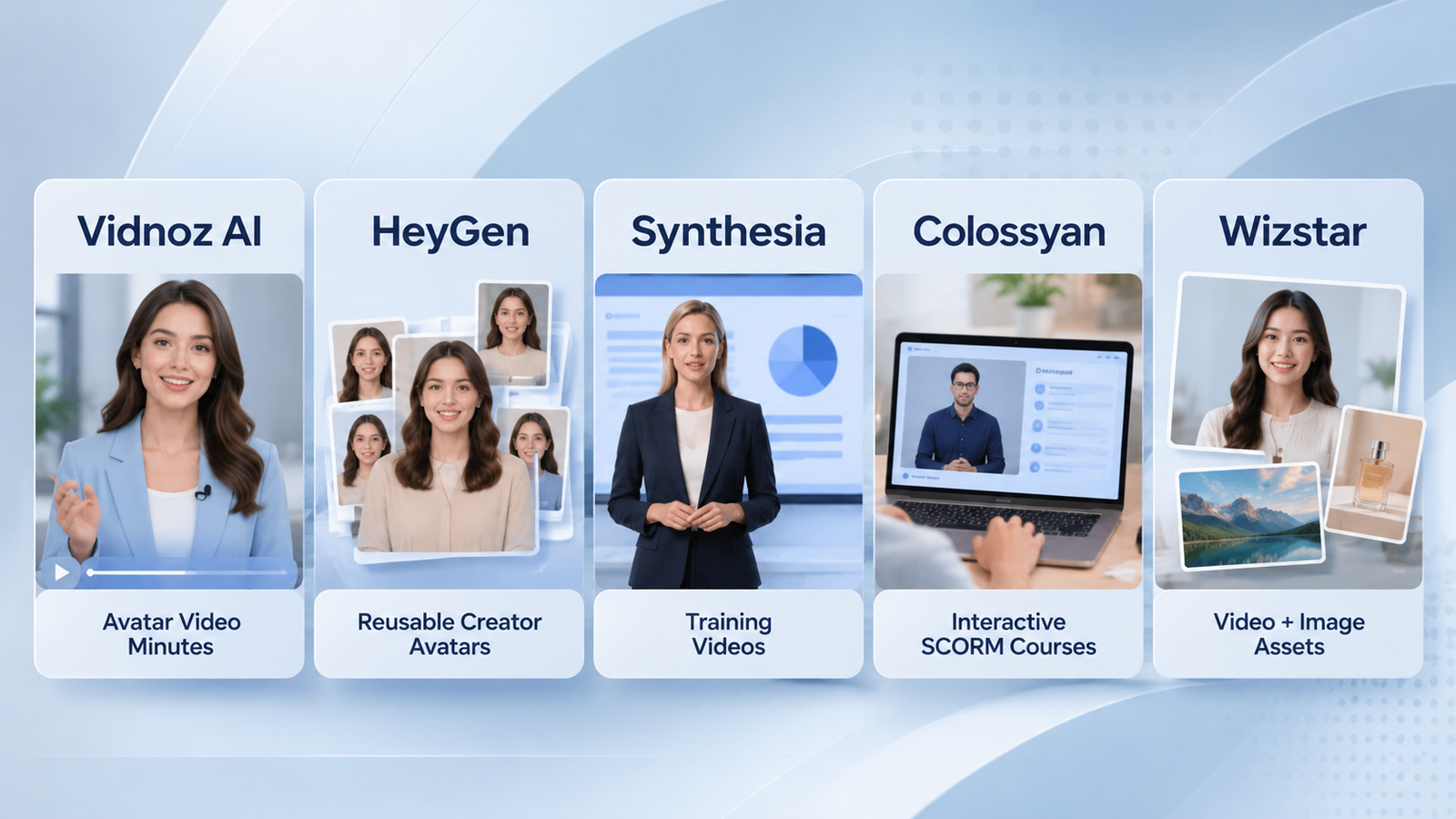
HeyGen leads the pack among Vidnoz AI alternatives for recurring creator avatars, while Colossyan is built for courses that require direct learning-platform delivery. Synthesia excels at structured training videos, and Wizstar combines talking avatars with standalone scene and image generation tools for multi-asset social campaigns.
When deciding between them, start with your primary deliverable: a recognizable personal brand presenter, a downloadable training video, an interactive SCORM course, or a full set of ad creative assets. Your monthly allowance needs to cover finished work you can actually publish.
Which Vidnoz alternative fits your workflow?
Vidnoz sets a practical baseline: its Starter plan provides 1080p exports and removes watermarks. Switching platforms only makes sense if you need to solve a specific production bottleneck. A recurring video series requires a consistent visual identity. Corporate training usually calls for structured lesson templates or LMS integration. Social ad campaigns often require supporting B-roll, product cuts, and static visuals alongside the presenter.
The four alternatives below address different combinations of these production needs:
| Tool | Main workflow | Relevant capabilities | Important boundary |
| HeyGen | Recurring presenter videos | Custom avatar, reusable templates, brand kit | Creator excludes SCORM and interactive quizzes |
| Synthesia | Structured training lessons | AI Video Assistant, stock avatars, templates | Live collaboration and SCORM require Enterprise |
| Colossyan | Interactive courses | Custom presenters, interactive videos, streaming SCORM | Professional has a limited export allowance |
| Wizstar | Mixed social creative | Photo/video avatars, separate scene and image tools | Assets still need selection and assembly |
Focus on what each platform provides beyond basic avatar generation—whether that means reusable branding, structured lesson modules, LMS-ready course packages, or supporting visual assets for ad creative.
What do the monthly plans actually buy?
To make a fair comparison, assume a solo creator or a small production team with one editor creating regular, watermark-free content. Vidnoz Starter, HeyGen Creator, Synthesia Starter, and Wizstar Starter represent entry-level paid tiers for these workflows. Because their feature sets diverge, evaluate them by the output they deliver.
Colossyan Professional is an exception here: its free Starter plan excludes SCORM, whereas the $89 Professional tier unlocks video downloads and streaming SCORM packages for course deployment. It serves a different operational requirement.
| Representative plan | Monthly USD | Included allowance | Capacity and allowance-equivalent cost |
| Vidnoz Starter | $26.99 | 450 credits | Up to 15 Expressive Avatar HD minutes; ~$1.80/minute |
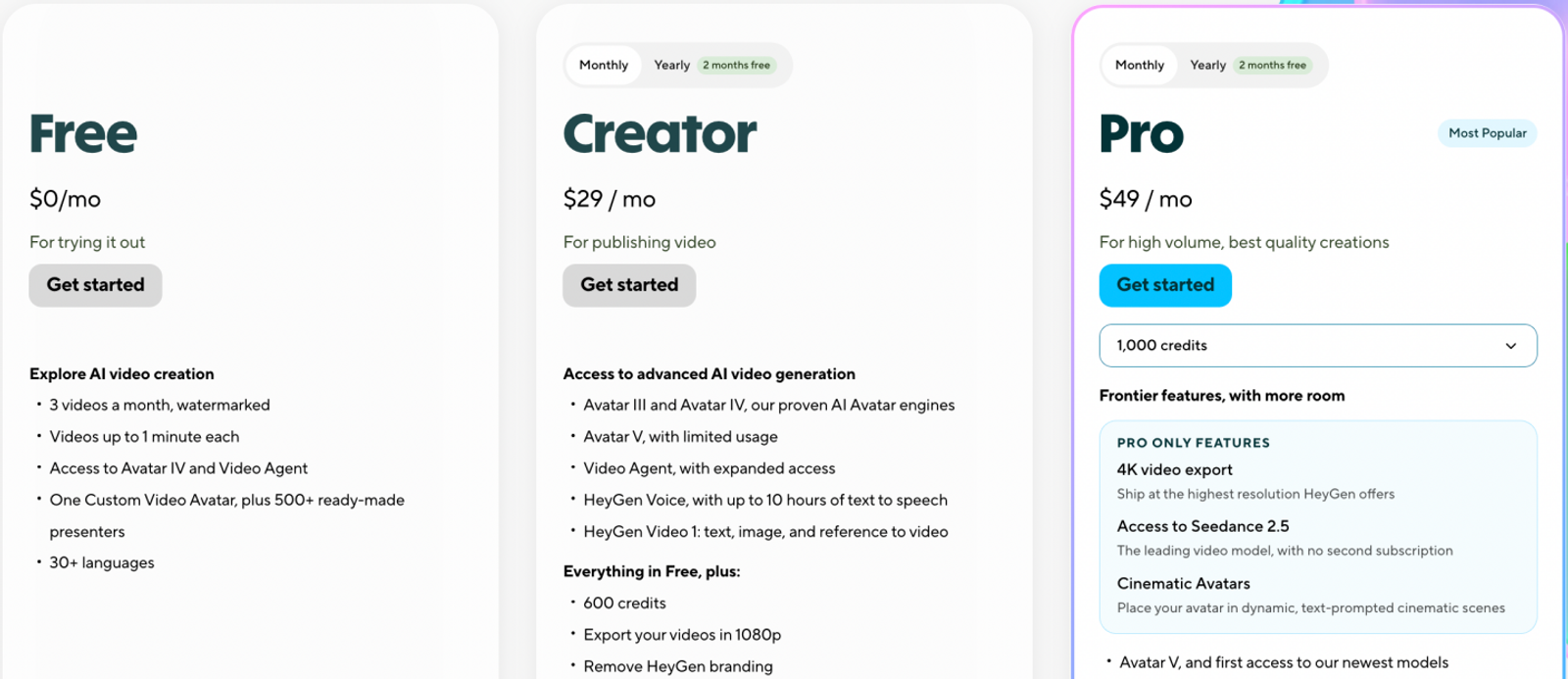
| HeyGen Creator | $29 | 600 credits | 37.5 Avatar IV Photo Look minutes; ~$0.77/minute |
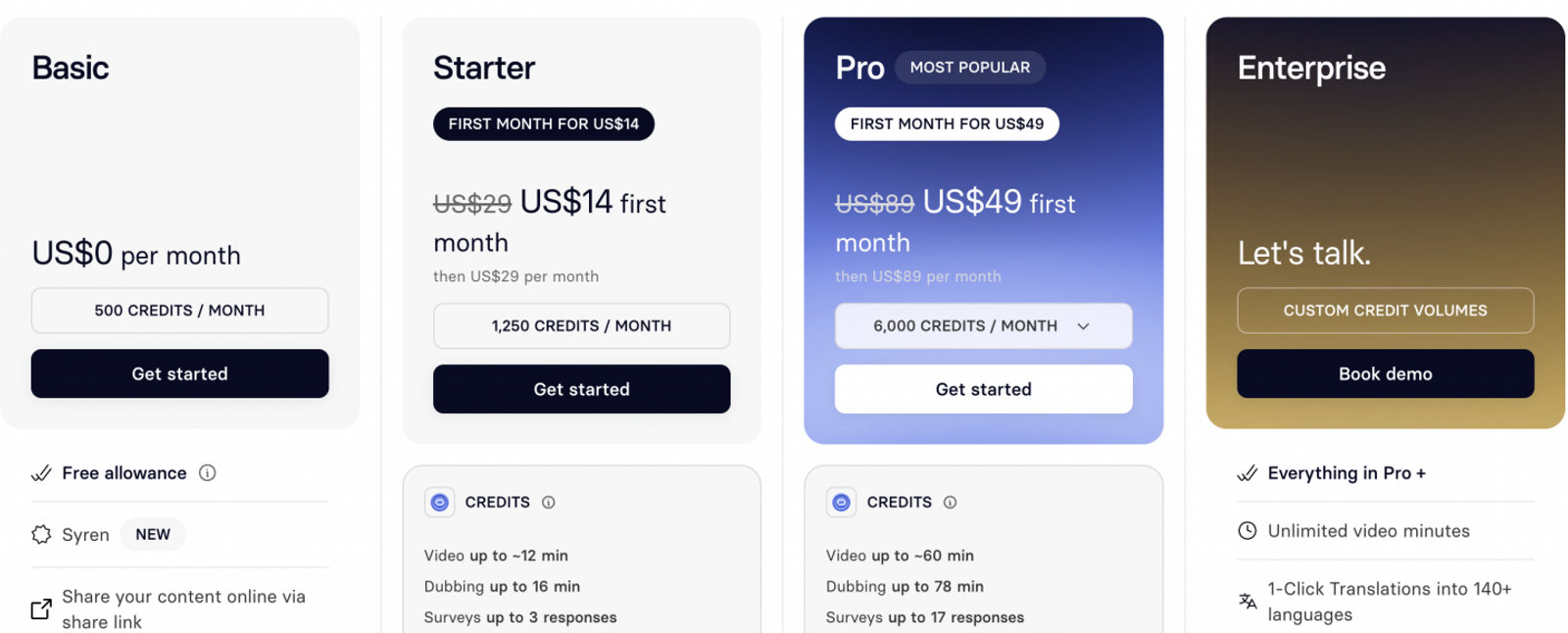
| Synthesia Starter | $29 renewal; $14 first month | 1,750 total credits plus 10 video minutes | Typical ~27 finished minutes; ~$1.07/minute |
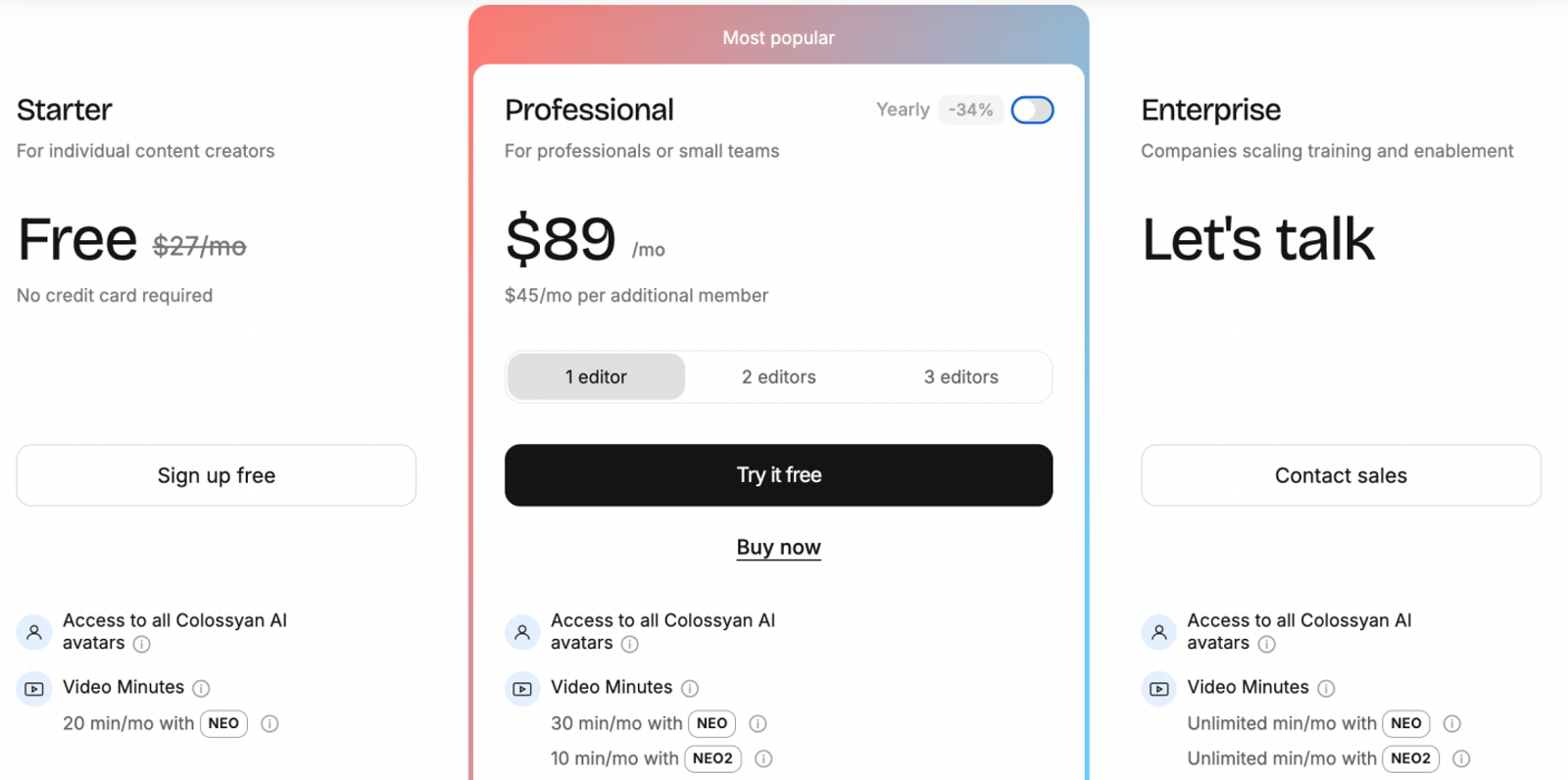
| Colossyan Professional | $89; one editor | 30 NEO minutes; 10 NEO2 minutes | Separate engine pools; five streaming SCORM exports |
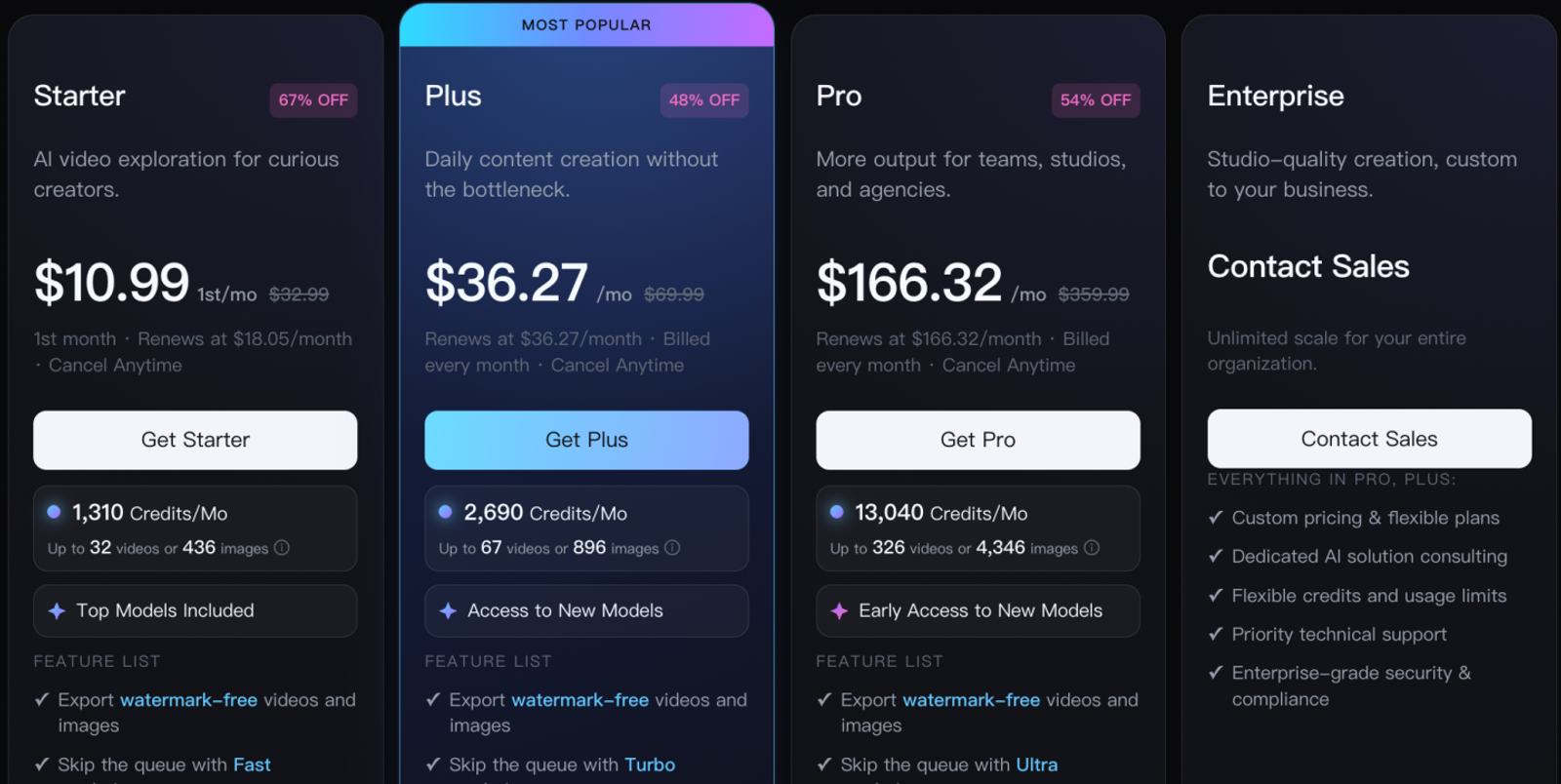
| Wizstar Starter | $18.05 renewal; $10.99 first month | 1,310 credits | 43 five-second H3 scenes, ~$0.42 each; OR 327 Lite images, ~$0.055 each |
A $30-per-month subscription buys very different workflows across these platforms. Looking strictly at unit cost per minute will not give you the full picture.
At a price point close to Vidnoz, HeyGen provides greater monthly headroom for frequent presenter content under its Photo Look rate of 16 credits per minute. That capacity pairs naturally with custom avatars and reusable brand presets. Keep in mind that switching to a more demanding avatar rendering mode will burn credits faster.
Synthesia’s $29 monthly fee purchases an end-to-end training setup featuring structured templates, diverse stock avatars, and standalone video downloads. Its standard usage example pairs roughly 17 credit-funded minutes with 10 bundled video minutes. Your actual mileage depends on how much screen time your avatar uses and how you allocate credits across other tools. For a recurring onboarding or training curriculum, those built-in pedagogical tools easily justify the price tag.
Colossyan justifies its premium when you need direct LMS integration. Producing four 5-minute NEO lessons uses 20 minutes and four streaming SCORM exports, leaving you with one export to spare. That $89 rate makes sense if your release schedule actively relies on LMS tracking. If you only produce standalone MP4 files, you will end up paying for enterprise features you do not use.
Wizstar’s MiniMax H3 video scenes consume 6 credits per second at 720p, while Nano Banana 2 Lite images take 4 credits at 1080p. Producing twenty 5-second video scMiniMax H3enes plus 40 marketing images consumes 760 credits, leaving 550 credits in your balance. A dynamic paid social campaign can take full advantage of this flexible split, though you still need to assemble and edit those 60 assets into finished creatives.
If your production volume is low, a fixed monthly fee will inevitably drive up your cost per finished video. Choose your subscription tier based on your publishing calendar rather than stocking up on credits that sit idle.
HeyGen for creator-led talking avatars
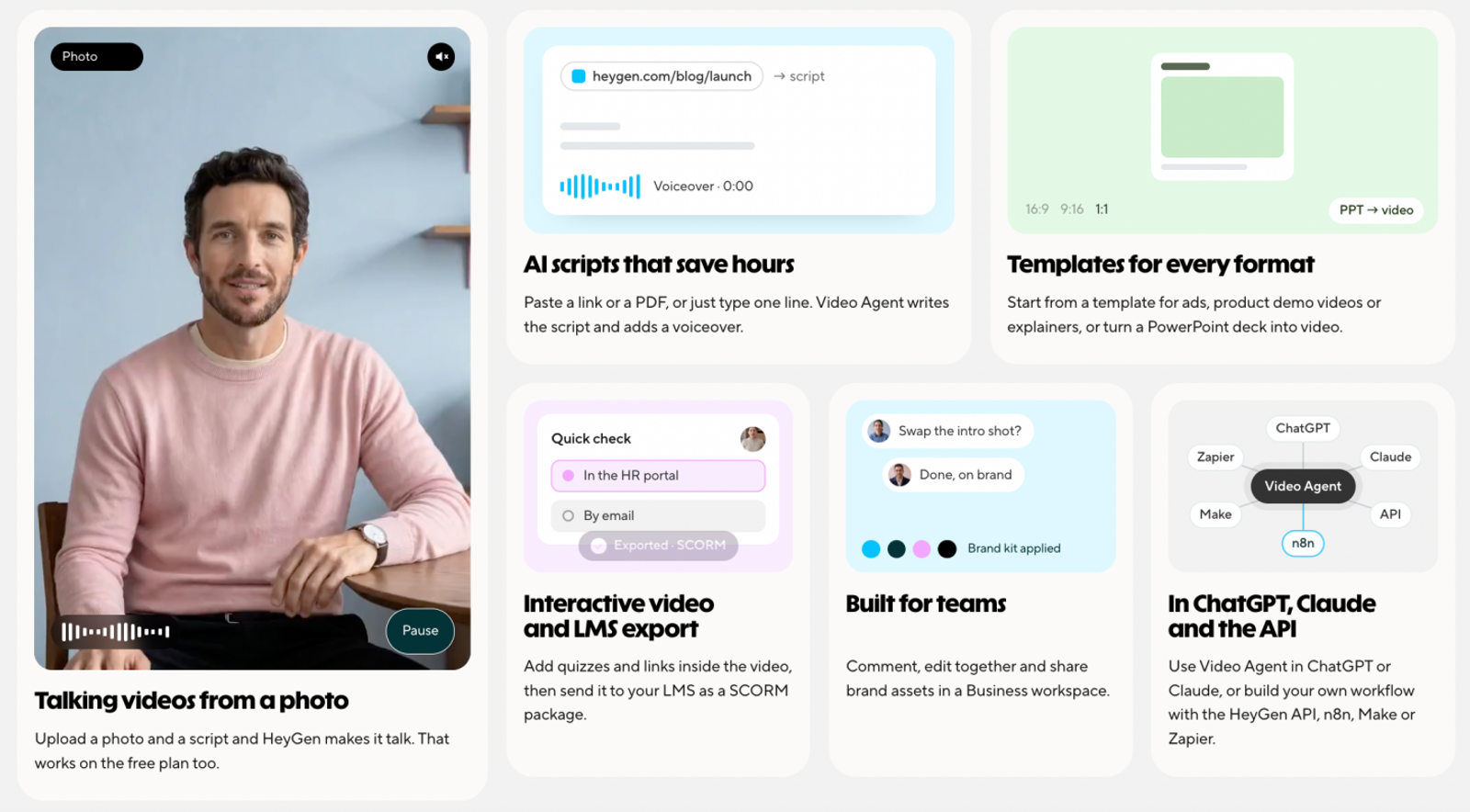
HeyGen stands out when you need a recognizable, recurring on-camera presenter across an entire video series. Its Creator plan includes a custom video avatar modeled after your own likeness and voice, along with access to Avatar III and Avatar IV generation. This allows you to roll out weekly feature updates, explainers, or newsletters featuring the same familiar face.
The supporting studio environment is equally capable. Creator provides full access to the AI Studio Editor, customizable templates, a central brand kit, and the ability to save custom canvas designs. You can build a standardized layout for product releases and maintain consistent visual framing across dozens of clips.
Direct PowerPoint and PDF document imports also make it easy to convert existing slide decks into polished video presentations. Creators can import approved corporate slide decks, assign avatar narration, and publish updates in minutes. Support for over 175 languages and regional accents streamlines localized releases, though translated scripts still require proofreading.
HeyGen Creator is the top choice for branded presenter content. At $29 per month, it combines reusable brand kits with an accessible entry-level budget, provided your rendering mode aligns with your monthly credit pool. The critical cutoff is course management: Creator does not include SCORM packaging or interactive user quizzes.
Synthesia for structured training workflows
Synthesia’s key advantage lies in its specialized framework for corporate training and internal communications. The Starter plan provides an AI Video Assistant, over 125 stock presenters, direct video downloads, and watermark-free exports. The platform also offers a library of more than 60 structured templates designed for instructional design.
For example, when producing a multi-part employee onboarding sequence that covers one standard operating procedure per video, you can select an avatar and layout built for visual clarity and maintain that exact layout across every module. Standardized visual framing helps viewers focus on key instructions. The templates provide clean layouts, leaving you to focus on the educational content itself.
Direct video downloads make Starter ideal when your deliverables are standard MP4 files. Project managers tasked with producing onboarding or help-center libraries can produce finished assets without dealing with complex LMS setups.
At $29 per month (with a $14 first-month promotion), Starter is the practical choice for recurring, standalone instructional video libraries. The extensive presenter roster and ready-made lesson templates keep production moving smoothly. However, real-time team collaboration and SCORM export remain restricted to Enterprise tiers, so growing teams should plan their budgets accordingly.
Colossyan for courses that need SCORM export
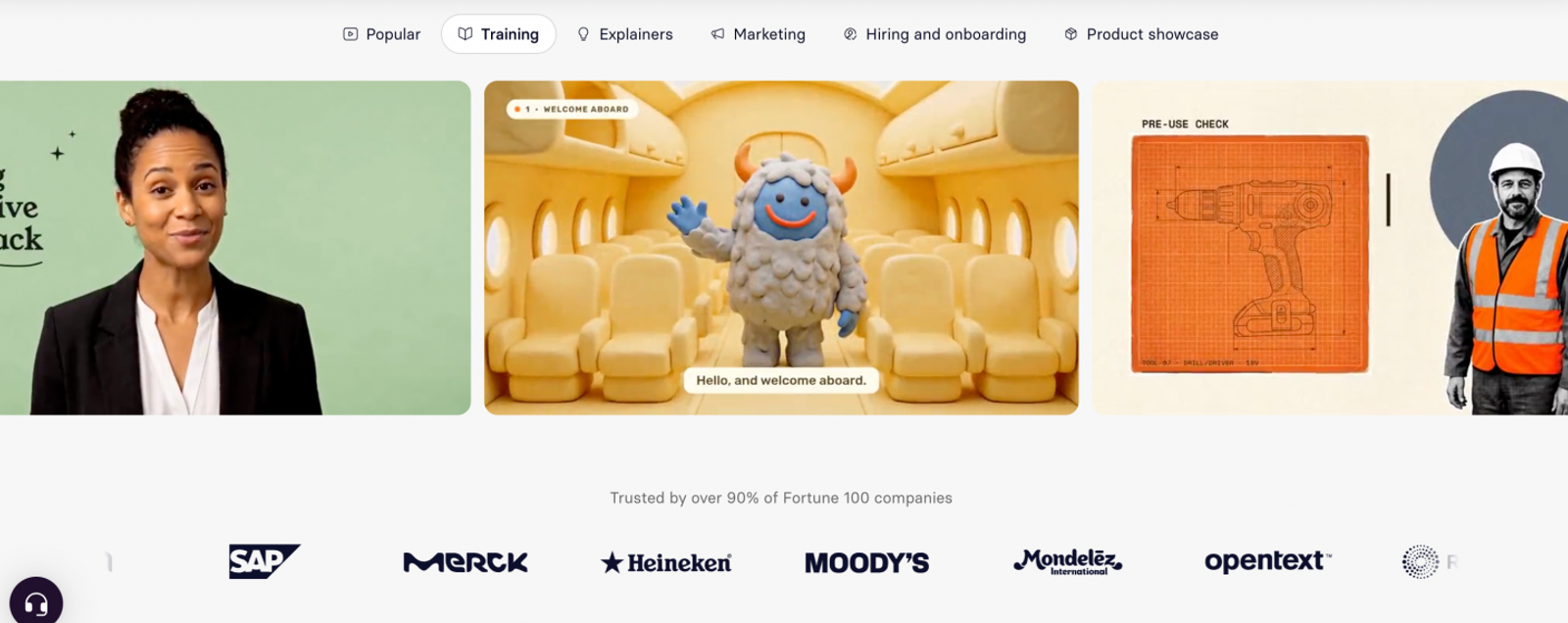
Colossyan Professional is purpose-built to bridge course creation and direct LMS delivery. Its official plan provides five streaming SCORM exports every month. SCORM packages bundle your video lessons so they communicate smoothly with LMS platforms, tracking learner progress and completion.
Beyond SCORM delivery, Professional includes monthly capacity for 15 interactive videos, 20 custom avatars, and five custom AI voice clones. You also inherit standard Starter perks like brand asset management and multi-avatar conversations on screen. This toolset gives instructional designers everything they need to maintain brand consistency and run multi-character scenarios within a single lesson.
A practical use case is a compliance or onboarding sequence split across four distinct modules. You can manage them under a single brand kit, assign specific presenters to different subject areas, and introduce interactive branching where viewer input tests knowledge retention.
Colossyan Professional is the default choice for structured instructional programs that live directly inside an LMS. The $89 plan handles four-to-five interactive modules alongside their required export files. Be sure to confirm that streaming SCORM aligns with your LMS setup; self-contained SCORM and unlimited streaming are reserved for Enterprise. If you only need standalone MP4 video files, the premium price is difficult to justify.
Wizstar for avatars, short scenes, and image assets
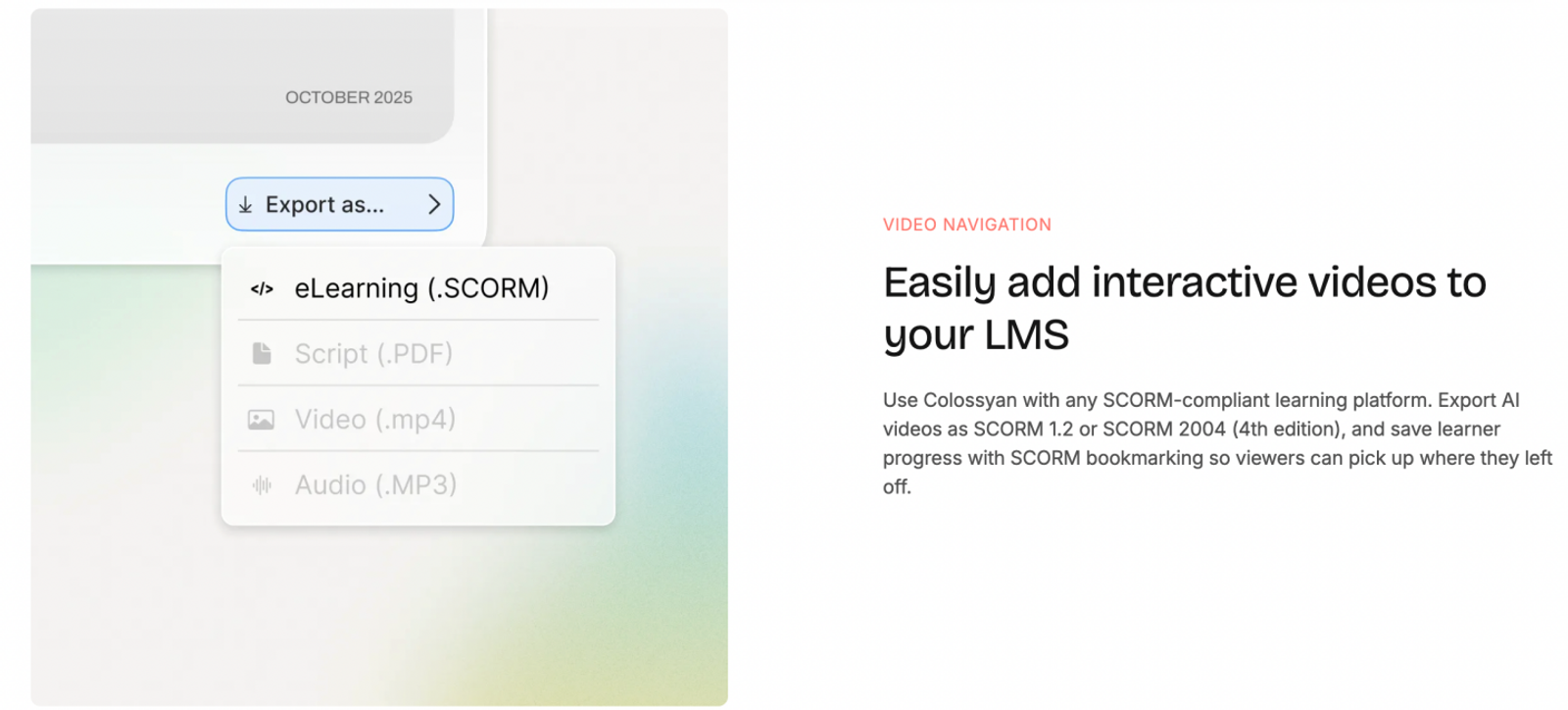
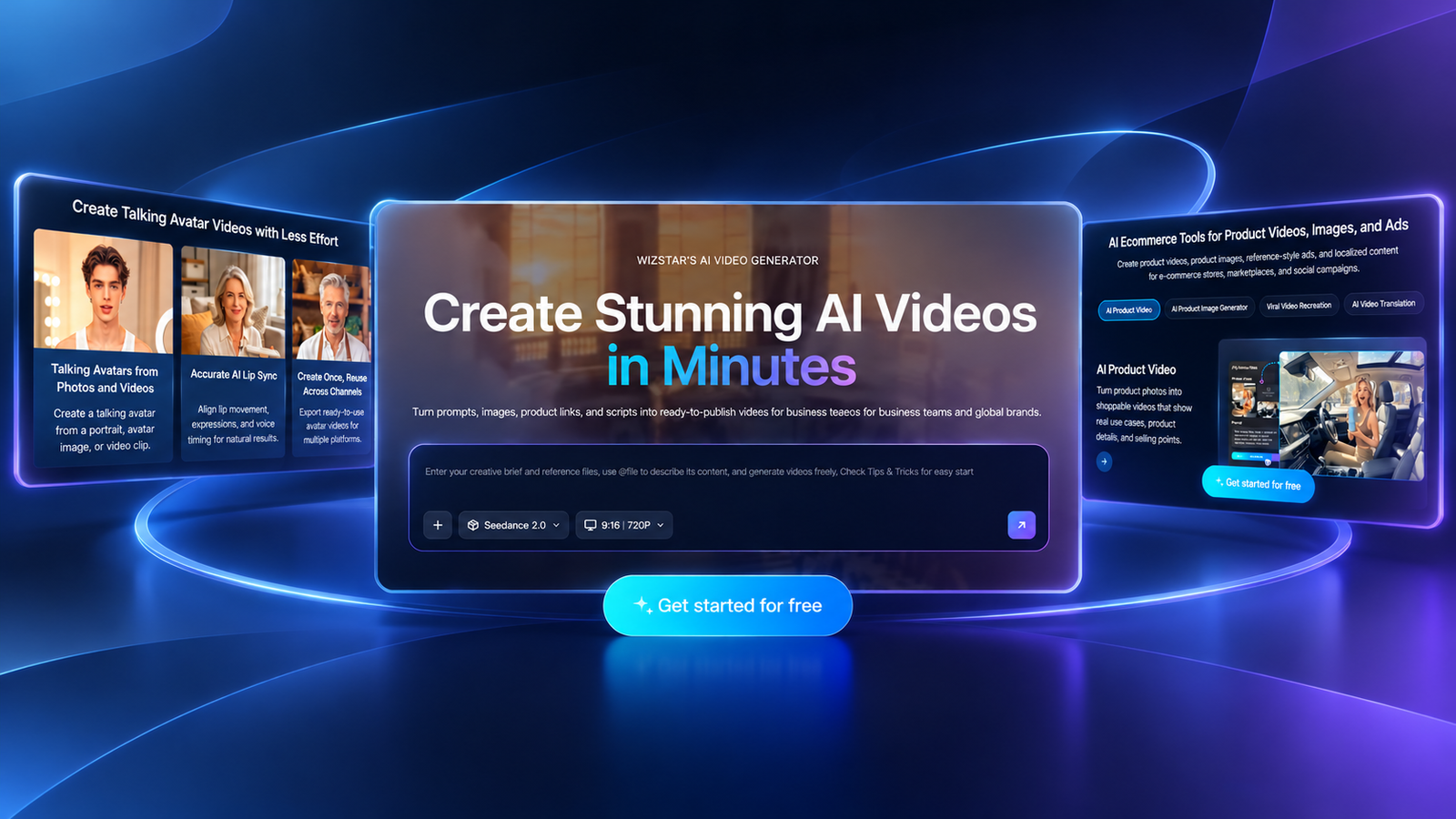
Wizstar is tailored for social ad campaigns that require diverse creative assets beyond a simple talking head. Its AI avatar tool accepts portraits, rendered avatar graphics, or source video clips paired with a written script. You can transform a still brand headshot or a silent studio clip into an expressive talking presenter, putting existing creative assets back to work.
For direct-response video ads, you can open with an engaging 3-second avatar hook, followed by generated product b-roll clips, and close with static lifestyle images. Using the same portrait across different creative variants maintains brand consistency while allowing you to test different ad angles.
The platform includes dedicated video generation, image creation, and product video modules to produce your supporting campaign elements. You map out your b-roll scenes, product showcases, and speaking hooks, then assemble the generated pieces in your video editor of choice.
Wizstar fits mixed-format social ad production where a talking presenter works alongside b-roll and still visuals. Its Starter renewal rate of $18.05 comfortably covers a multi-asset monthly workflow. Paid plans remove export watermarks; commercial usage remains subject to platform terms, and custom voice or avatar clones are billed as separate add-ons.
Make the next project your deciding test
Let your next active project dictate your platform choice. Define your required output format, calculate your realistic revision rounds, and check the export requirements of your publishing channel. Then measure that total production footprint against the plan's standard monthly renewal cost. A subscription is only as valuable as the finished, usable files it delivers to your timeline.
If you have a source portrait and a working script ready to test, Wizstar’s AI avatar tool provides a fast, lightweight starting point. Scale your paid tier once your real-world production schedule and monthly output prove the investment pays off.
FAQ
- Can I try Wizstar for free without a credit card?
- Yes, Wizstar provides a free plan that you can access without entering credit card information. It lets you test the creation interface and avatar workflow before subscribing. Check your account dashboard for current free credit limits and export restrictions before committing to a full client project. Free tiers do not include commercial usage terms or the watermark-free exports provided on paid plans.
- Do unused Wizstar subscription credits roll over?
- Wizstar does not guarantee universal credit rollover across billing cycles. Refer to the specific plan terms displayed in your user dashboard and checkout screen. The pricing page outlines current expiration and renewal policies. It is generally best to buy the credit tier that matches your immediate monthly production schedule rather than banking extra credits for later.
- Can I get a refund if I cancel my Vidnoz subscription?
- Vidnoz offers a 7-day money-back guarantee on annual plans, but monthly subscriptions are non-refundable. According to its published billing policy, subscription cancellations must be submitted via customer support. Any remaining credits remain accessible until your current billing period ends. When reaching out to support, distinguish clearly between a cancellation request and an eligible refund inquiry.
- Can I use my own recorded voice in a Wizstar talking-avatar video?
- Yes, Wizstar allows you to upload pre-recorded audio files for talking-avatar videos. The AI avatar FAQ confirms that you can either type a text script or upload an audio track directly. This lets you record custom voiceover narration or use professionally mastered audio to drive the avatar's lip-sync. Uploading an existing audio file is a built-in feature and does not require purchasing a custom voice clone.
- Which payment methods can I use for a Wizstar subscription?
- Wizstar displays the payment options available for your country at checkout. The pricing page lists all base plan prices in US dollars, with applicable local taxes calculated during checkout. Select your preferred subscription tier and billing cycle to view supported credit cards and digital payment processors in your region.