UGC Ad
AI Ads Generator
Create product ad videos for social media, paid campaigns, and brand promotion from product images, video references, or a simple brief.
Create Product Ads for Every Channel
Create polished product ads for e-commerce listings, social media, and paid campaigns, with creative directions tailored to your audience and goal.
Start for FreeBrand Ad
Lifestyle Ad
Product Ad
UGC Ad
Brand Ad
Lifestyle Ad
Product Ad
UGC Ad
Brand Ad
Lifestyle Ad
Product Ad
Everything You Need in an AI Ads Generator
Turn a simple idea or product into a complete ad with the tools to plan, create, refine, and adapt your creative—all in one workflow.
Keep Products and Character Consistent
Use 3–5 reference images to keep product details, materials, logos, and people consistent across scenes, angles, actions, and expressions.
Start for FreeTurn Ideas Into Complete Ads
Start with a product, image, or simple brief and build it into a complete ad with a clear concept, story, and visual direction.
Start for FreeThe Latest AI Models, all in Wizstar.
Access the latest AI video models, including Seedance 2.5, all in one place. Use multiple models within a single workflow and bring their unique strengths together to get the best result for every scene.
Start for FreeWIZSTAR MODEL LIBRARYTOP MODELS · ALL IN ONE PLACE

Seedance 2.530s cinematic shots

MiniMax H3High-resolution output

Kling 3.0 OmniRealistic motion

GPT Image 2Precise image generation
More ModelsMore creative options

Nano Banana 2Fast visual concepts
Nano Banana ProPolished image detail
Nano Banana 2 LiteLightweight iteration
Seedance 2.0Connected video scenes
Seedance 1.5Reliable video motion
One workflowEvery creative directionWizstar
Create Your Own Avatar for Product Ads
Create your own AI Avatar and use it to present products, demonstrate how they work, and generate product ads for social media and paid campaigns.
Start for FreeAI Ad Translation for Global Campaigns
Adapt your ads for different markets with support for 75 major languages, natural voice and lip-sync alignment, and smooth multi-person dialogue across social and paid campaigns.
Start for FreeTurn Product Ideas into Ad Videos in Three Steps
From product details to polished ad creative, turn your campaign idea into a ready-to-share video in three simple steps.
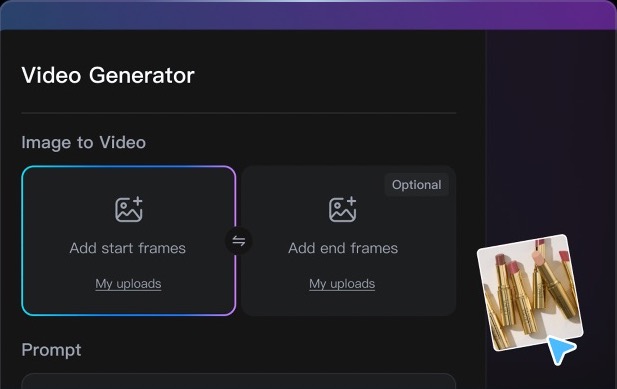
STEP 01
Add Your Product
Upload product images or video references and describe the offer, audience, or visual direction you want to promote.
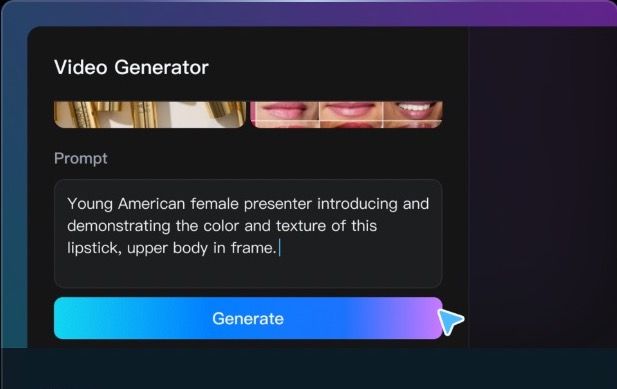
STEP 02
Shape the Ad Concept
Turn your inputs into a clear hook, script, shot plan, and visual style designed for your campaign.
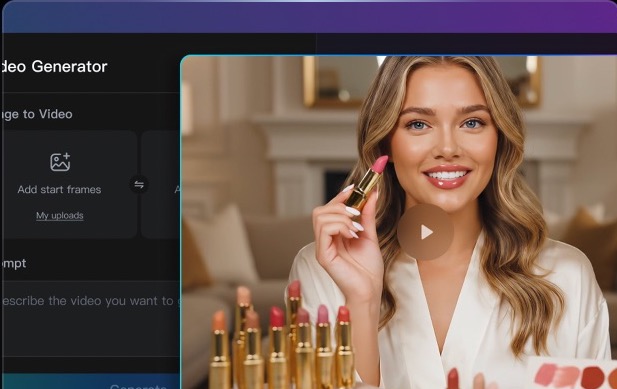
STEP 03
Review and Export
Generate the video, refine the details, and export a polished ad for your storefront, social feed, or paid campaign.
Multiple AI Models
Top AI Models Powering Wizstar’s Ad Creation
Wizstar brings four AI video models into one workflow, so you can match each brief with the kind of motion, continuity, and shot length it needs.
Seedance 2.0
Stable audiovisual storytelling
Choose it for connected scenes that need reliable visual continuity, synchronized sound, and a smooth narrative flow.
Seedance 2.5
Longer multi-reference shots
Choose it for a single shot up to 30 seconds when several visual references need to stay connected in one directed sequence.
MiniMax H3
High-resolution cinematic control
Choose it for visually rich scenes that benefit from expressive character motion, detailed subjects, and polished high-resolution output.
Kling 3.0 Omni
Realistic motion and physics
Choose it to bring product shots, characters, and image references to life with grounded movement and believable physical detail.
What Wizstar Creators Say
See how teams use AI to create, test, and refine product ads.
We turned one product shoot into a full week of ad variations, testing new hooks and formats without booking another production day.
Emma L. · E-commerce Growth LeadThe product stays consistent across every scene, so our paid-social team can move from concept to launch much faster.
Marcus T. · Performance Marketing ManagerIt is easy to create separate versions for different audiences while keeping the same offer, branding, and call to action.
Sophia R. · DTC Brand DirectorOur creative testing cycle is noticeably shorter. We can see which opening and product angle works before scaling spend.
Daniel K. · Paid Media SpecialistFrom a rough brief to polished vertical ads, the workflow gives our small team the output of a much larger creative department.
Olivia P. · Marketplace Marketing LeadQuestions and Answers
Can I use an AI video ads generator online for free?
Yes. Wizstar offers a free trial after registration, so you can create AI ad videos online before choosing a membership plan.
Can I create AI ad videos without a watermark?
Free trial videos include a watermark. A membership plan is required to export AI ad videos without a watermark.
Can I use an AI ad generator for social media and paid campaigns?
Yes. You can switch between supported AI video models and choose different output aspect ratios for social media ads, paid campaigns, and other creative placements.
What is the best AI ad generator for creating product ads?
The best tool depends on your product, creative workflow, model options, output formats, and budget. Wizstar is built to turn product images, video references, or a simple brief into ad videos for different audiences and campaigns.
Can I create different ad versions for different audiences?
Yes. Create separate versions by changing the prompt, reference materials, AI video model, aspect ratio, or resolution while keeping the same product brief.
What product materials do I need to make an AI ad video?
You can start with a product image, video, or audio reference, together with a clear description of the product, offer, audience, or creative direction you want to communicate.
Can I create both vertical and horizontal ads for the same product?
Yes. The creation controls include 9:16 and 16:9 output options, so you can prepare the same product concept for vertical and widescreen placements.
How can I keep the product and brand details consistent?
Use clear product references and repeat the important brand, product, and offer details in the prompt. The result can vary by generation, so review the output before publishing.
Create Product Ads Built for Attention and Action
Turn product details into ad videos ready for e-commerce listings, social media, and paid campaigns.
Start for Free