When we test a new feature in an AI video model, the usual approach is pretty simple: Upload a reference video, write a prompt, generate a clip, and then ask:
Does it look similar?
If the motion transfers successfully, we call the feature good. But honestly, I don't think that kind of test tells us very much.
Creating an AI video that looks “pretty good” is no longer that difficult. With a decent prompt and a capable video model, you can already generate clips with attractive visuals, consistent characters, and reasonably convincing motion.
For short-form videos, ads, e-commerce content, music videos, AI comics, and even early visual concepts, that may be enough.
But if you're actually trying to make an AI film that needs to survive a serious review, the standard is different.
Once almost everyone can learn to generate a decent-looking AI video, the reviewer may look at your work and say:
“It looks good.”
But that doesn't necessarily mean:
“This is ready to approve.”
And the frustrating part is that they may not even be able to tell you exactly what's missing.
It isn't necessarily the image quality.
It isn't necessarily the character.
It may not even be the motion.
Every individual element can look fine, yet the shot still feels like it is missing something.
I think of it as the gap between:
“An AI-generated video”
and
“A cinematic shot that feels intentionally directed.”
So this time, I didn't want to write another basic tutorial about how to use Reference in MiniMax H3.
I wanted to test one specific question:
If I really push Reference further, can it help make my AI films feel more cinematic?
I tested it through motion, camera movement, timing, multi-character interaction, and different ways of combining references.
The goal wasn't simply to prove that the feature works.
It was to figure out:
How should I actually use it when I'm trying to make a film?
Test 1: I Started by Separating Character Motion from Camera Movement
This was the first thing I wanted to test.
A Reference Video may look like a simple “motion reference,” but it often contains much more information at the same time:
- How the character moves
- How the camera moves
- When the character starts moving
- When the camera pushes in
- How the distance between the subject and camera changes
So if I simply tell H3:
Use Video 1 as a motion reference.
What exactly is it going to take from the video?
I started with a very simple comparison.
Test 1A: Referencing Character Motion and Camera Movement Together
My Reference Video was straightforward:
An actor walks toward the camera, stops, and turns around.
At the same time, the camera slowly pushes in.
I didn't add any additional restrictions. I simply told H3:
Use Video 1 as a motion reference.
Test Result
The generated clip preserved a noticeable amount of the character's forward movement.
But the camera also developed a forward-moving tendency.
That wasn't particularly surprising.
The original video already contained:
Character walking + Camera Push-In.
But this test made me realize something important:
I thought I was referencing an action, but I was actually referencing an entire shot.
So I ran another test.
Test 1B: Letting the Reference Control Only the Character
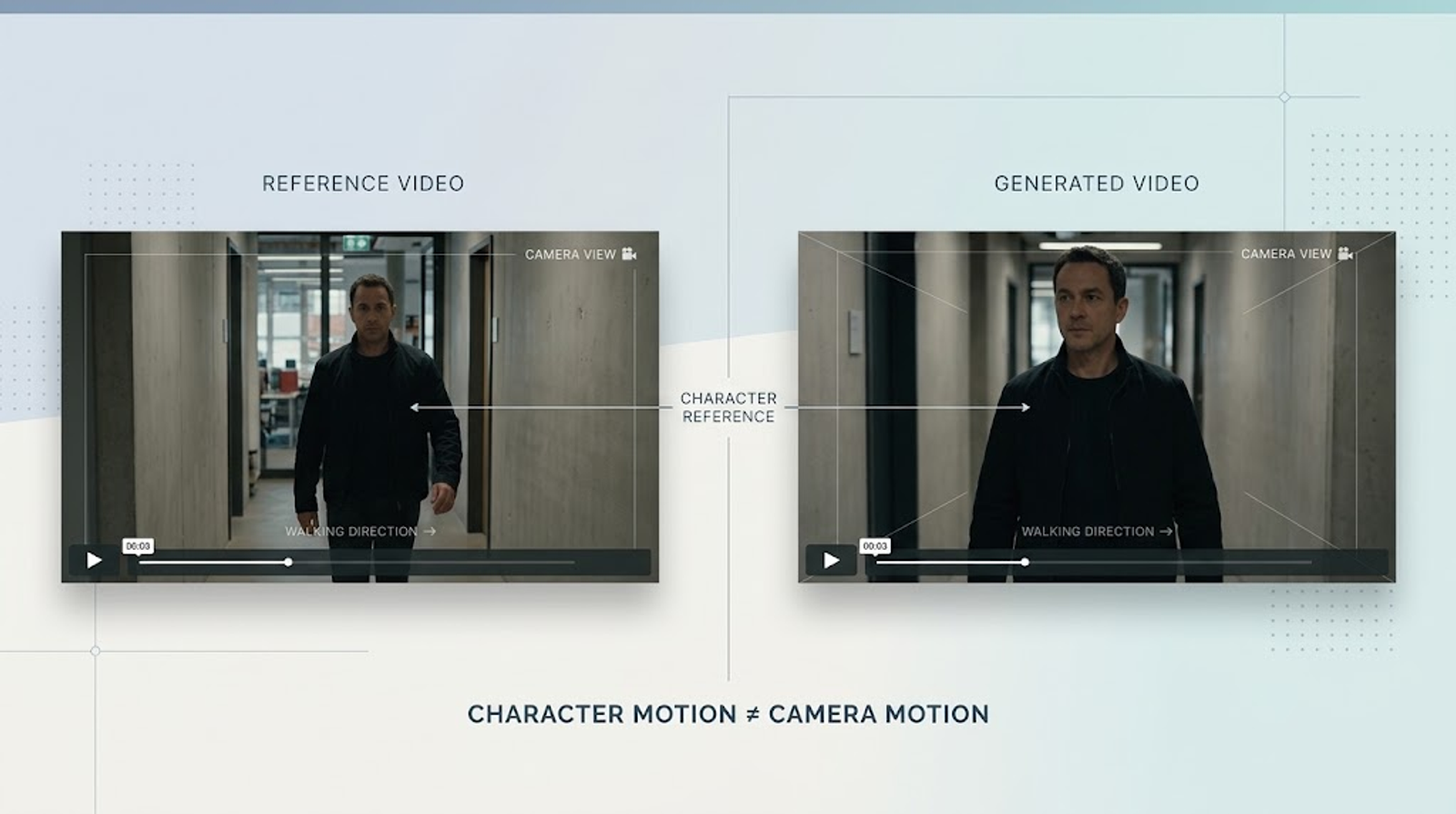
This time, I explicitly told H3:
Use Video 1 only for the character's movement. Keep the camera static.
In other words:
The character's movement comes from Video 1.
The camera does not.
Test Result
The character still followed a similar movement pattern, while the camera was much closer to a static setup.
For me, this result was more interesting than simply proving that motion transfer works.
Because it suggested a different way of thinking about Reference:
The most useful thing about Reference may not be copying. It may be assigning roles.
That also fits the broader way MiniMax describes H3's Reference system. Its official Reference Prompt Guide describes Video Reference as something that can be used for camera movement, cuts, rhythm, and temporal structure, rather than limiting it to character motion alone.
What I Took Away From This Test
If you're making a regular short-form video, saying:
“Use this video as a motion reference.”
may be enough.
But when I'm working on an AI film, I would ask a more specific question:
“Is this Reference controlling the actor, or is it controlling the camera?”
Because character movement and camera movement are two different layers of filmmaking.
Take the exact same character performing the exact same action:
- Static camera
- Dolly-in
- Tracking shot
- Handheld camera
The emotional effect can be completely different.
So now, when I look for a Motion Reference, the first thing I ask isn't:
“Does this action look cool?”
It's:
“Will the camera movement in this reference interfere with what I'm actually trying to control?”
Test 2: I Started Looking for the “Wrong” Reference
The first test helped answer one question:
Can I separate character motion from camera movement?
Then I wanted to test something less intuitive:
Does my Reference actually need to look like my target shot?
My answer is:
Not necessarily.
In fact, sometimes a reference that looks completely different can be more useful.
Test 2A: Using a Reference for Camera Movement Instead of Character Motion
Let's say I want to generate:
A man walking into a bar.
The obvious approach would be to find:
A video of a man walking into a bar.
But what if the only thing I really need is:
A slow camera push-in?
Then it doesn't really matter:
Who the person is.
What the bar looks like.
What the story is.
All I need is:
The camera movement.
So I used a completely different video.
Different person.
Different environment.
Different story.The only thing I cared about was:
Camera movement.
Then I told H3:
Use Video 1 for camera movement and pacing. Create a completely new character performance and environment.
Test Result
The generated clip preserved a noticeable camera-push tendency, while the character and environment followed the new prompt.
That was an interesting shift in my workflow.
I used to look for:
“A video that looks similar to my shot.”
Now I am more interested in finding:
“A video that contains the cinematic language I need.”
Test 2B: Sometimes I Look for “Cinematic Language,” Not Similar Content
If I want to shoot:
A nervous character walking into a room.
I don't necessarily need to find a video of:
“A nervous character walking into a room.”
I might look for:
A slow push-in.
If I want to show:
A character suddenly realizing there is danger.
I might look for:
Pause → Reaction → Camera Movement.
If I want to communicate:
Loneliness.
I might look for:
Wide Shot + Large Negative Space.
If I want to create:
A sense of pressure or claustrophobia.
I might look for:
Tight Framing + Slow Camera Movement.
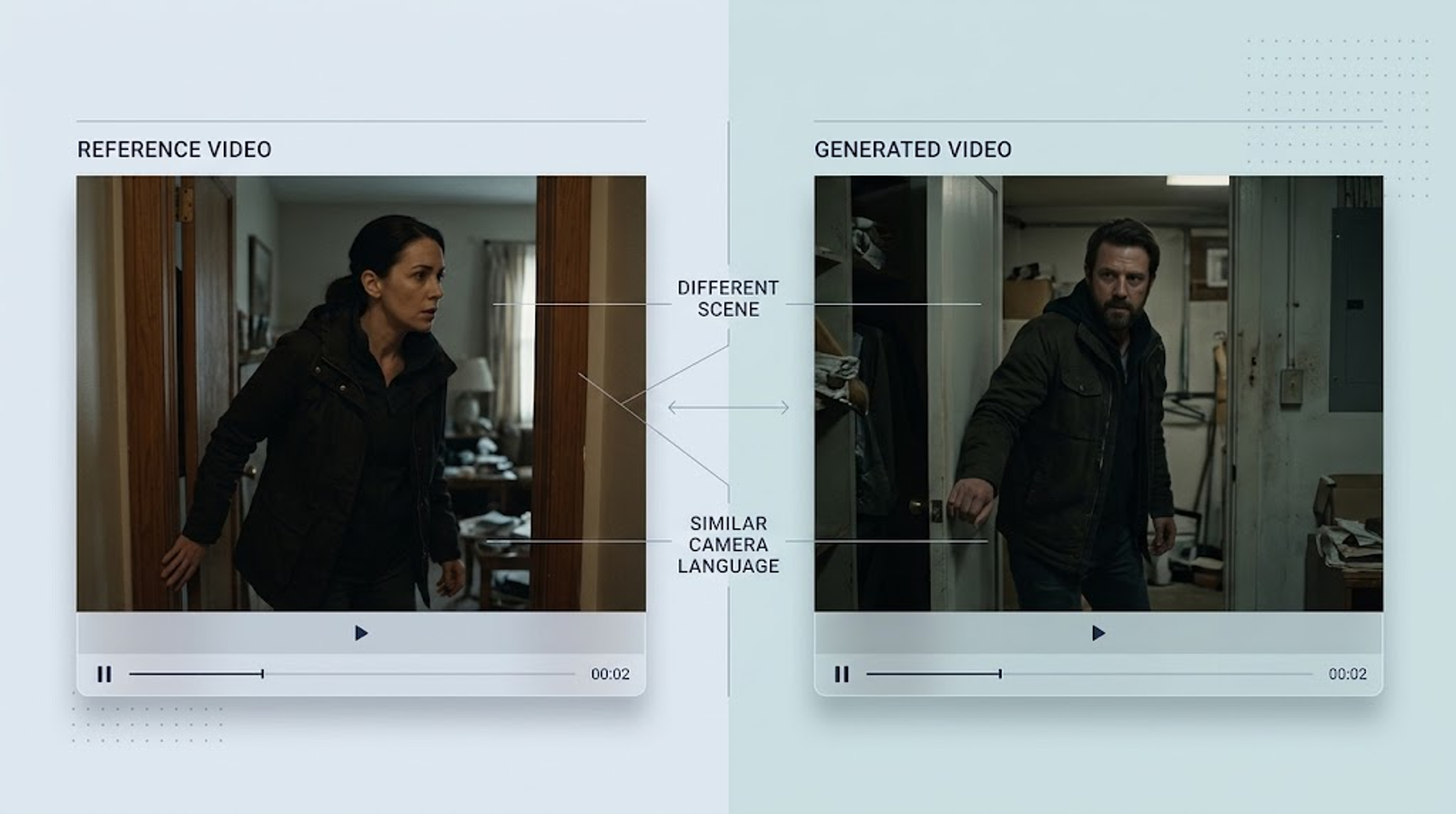
Test Result
The biggest change wasn't that the model suddenly produced dramatically better-looking footage.
It was that:
Reference started becoming part of my shot design.
I was no longer giving the model a complete video and saying:
“Make mine look like this.”
Instead, I was asking:
“What piece of cinematic language is missing from my shot?”
What I Took Away From This Test
This is probably one of the habits I'd recommend most to AI filmmakers:
Don't always look for content that resembles your shot.
Start looking for:
A reference that resembles the cinematic language you want.
Those two approaches sound similar, but they lead to very different workflows.
Test 3: I Started Testing the Invisible Parts of a Reference
The first two tests were relatively straightforward.
Then things got more interesting.
Because a Reference Video contains more than motion and camera movement.
There are other elements that are easy to overlook:
Timing.
Pacing.
Character relationships.
And sometimes:
Visual style.
If I don't test these separately, I can easily lump everything together and simply say:
“This video feels cinematic.”
But what exactly makes it feel cinematic?
I wanted to break that down.
Test 3A: The Most Important Thing to Transfer May Not Be the Motion, but the Timing
Suppose my Reference is a six-second shot:
0–2 seconds
The character slowly looks up.
2–4 seconds
They turn to the right and pause.
4–6 seconds
They take one step forward.
If I only describe the actions in the prompt:
The character looks up, turns right, and walks forward.
Then the model only needs to understand:
Look up → turn → walk.
But what may actually matter in a film is:
When does the character look up?
How long do they pause?
When do they turn?
Is there a pause before they move forward?
So in the second test, I explicitly described the timing:
0–2s: slowly look up. 2–4s: turn to the right and pause. 4–6s: take one step forward.
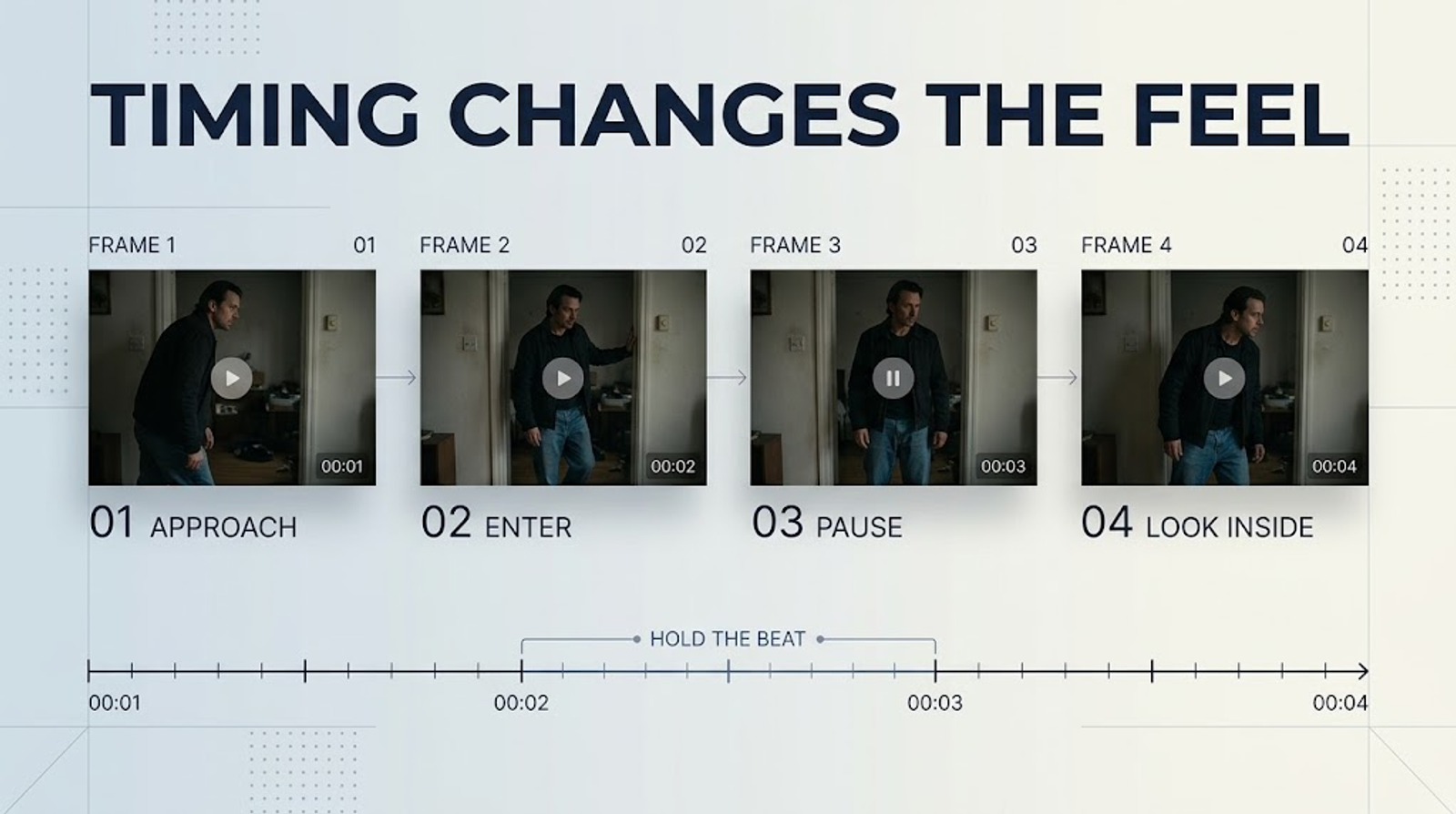
Test Result
The second result wasn't necessarily more complex.
What changed was:
The relationship between the actions became clearer.
The timing of the pause, in particular, had a noticeable effect on the emotional rhythm of the shot.
That made me rethink something:
A lot of cinematic feeling comes not from what happens, but from when it happens.
Why Timing Matters So Much for AI Comics and AI Films
If you're making AI comics, AI films, or narrative content, one of the most common problems isn't actually:
“The character can't move.”
It's:
The character moves at the wrong speed.
For example:
The character turns immediately after finishing a line.
But the scene actually needs a half-second pause.
Or the character should:
Look at the other person → realize something is wrong → step back.
The model produces:
Look → step back.
The actions are technically correct.
But the scene loses its dramatic beat.
So I now think about Reference in two different ways:
Motion Reference
Tells the model:
What to do.
Timing Reference
Tells the model:
When to do it.
Sometimes the second is even more important than the first.
Test 3B: Visual Style Can Become an Unintended Part of the Reference
Then I tested another question.
Suppose I find a beautiful cinematic reference:
- Low saturation
- Warm lighting
- Film grain
- Dark tones
But what I actually want is only:
The actor's movement.
Could the visual character of the reference still influence the result?
I compared two references with similar motion:
Reference A
Highly stylized:
Low saturation + film grain + warm color grading.
Reference B
Visually neutral:
Simple lighting + neutral colors + no obvious stylization.
In both cases, I asked H3 to focus on the character's movement.
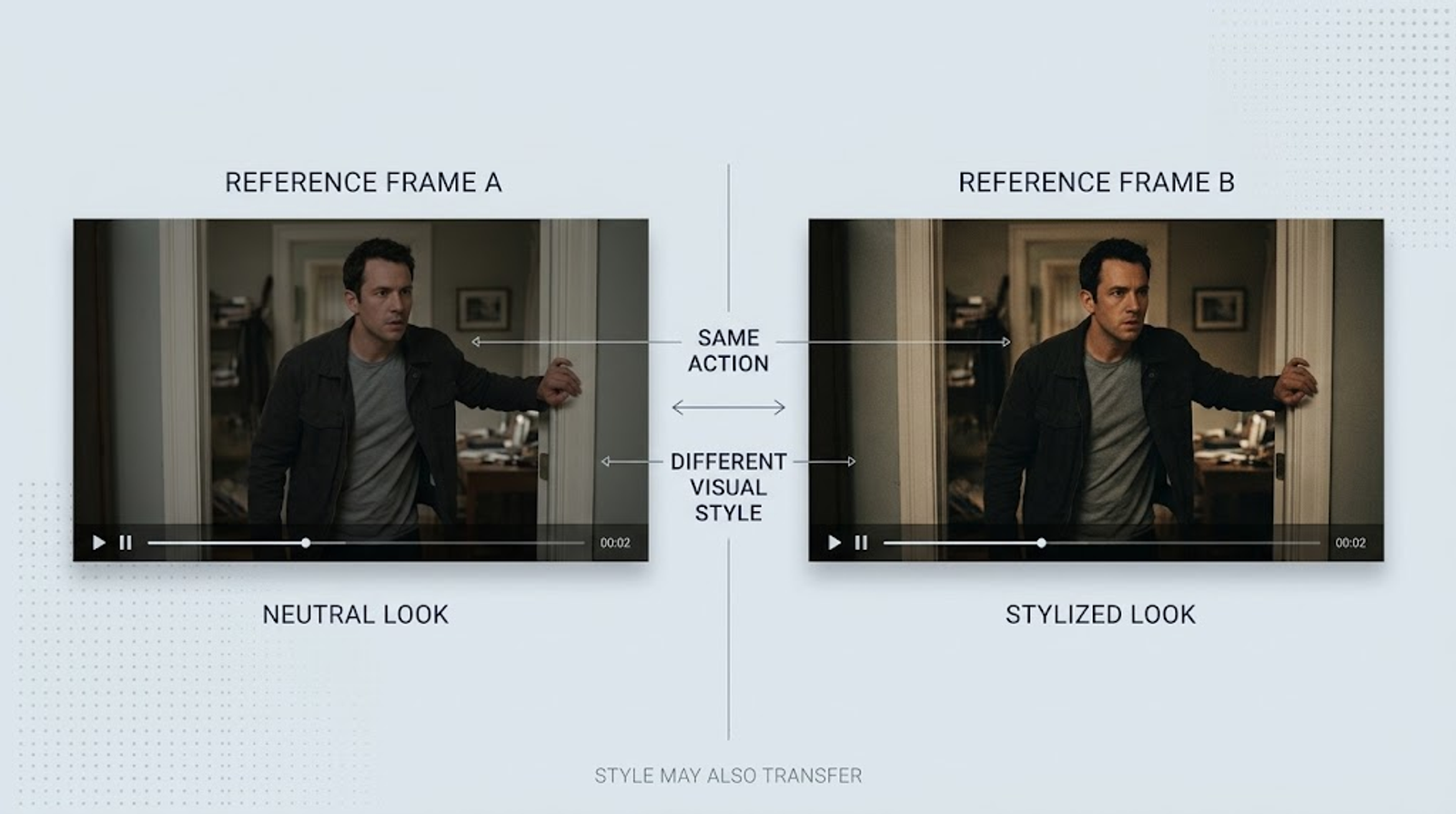
Test Result
The result from Reference A showed a stronger tendency toward the visual character of the source.
I wouldn't turn this into an absolute claim that:
“H3 will always copy the color grading or film grain from your reference.”
The official documentation does not make that guarantee.
But based on my own testing, I do think:
You shouldn't assume the visual information in a Reference Video simply disappears.
So if my goal is purely Motion Transfer, I actually prefer:
A clean, visually neutral reference.
Not necessarily the most cinematic-looking footage I can find.
What I Took Away From This Test: The Best Reference Isn't Always the Prettiest One
This was one of the biggest changes in my thinking.
I used to assume:
If the reference looks more cinematic, maybe the output will look more cinematic too.
Now I'm not so sure.If I need:
Motion.
I want the reference to have:
Clear movement.
If I need:
Camera.
I want:
Clear camera movement.
If I need:
Timing.
I want:
Clear action beats.
In other words:
The value of a Reference isn't how beautiful it looks. It's how cleanly it communicates the information I need.
Test 4: Complex Film Shots Start Testing How Well I Can Divide the Reference's Responsibilities
So far, each test followed a simple structure:
One Reference → One task.
But real AI filmmaking doesn't work that way.
A single shot may need:
- Character identity
- Motion
- Camera
- Timing
- Environment
- Audio
So I increased the difficulty.
Test 4A: Single-Character Motion and Multi-Character Interaction Are Not the Same Problem
A single-character action is relatively straightforward.For example:
Someone waves.
Someone turns around.
Someone walks forward.
But once I introduce two characters:
A walks over → B turns around → A stops → they look at each other.
The problem becomes much more complicated.
Now I need to manage:
- The position of both characters
- Who moves first
- Who reacts second
- Eye lines
- Distance between the characters
- Occlusion
- Spatial relationships
- The cause-and-effect relationship between actions
So I used a simple two-person interaction as a test.
The target characters were completely different.
The environment was also different.
The only thing I wanted to preserve was:
The basic interaction pattern and rhythm.
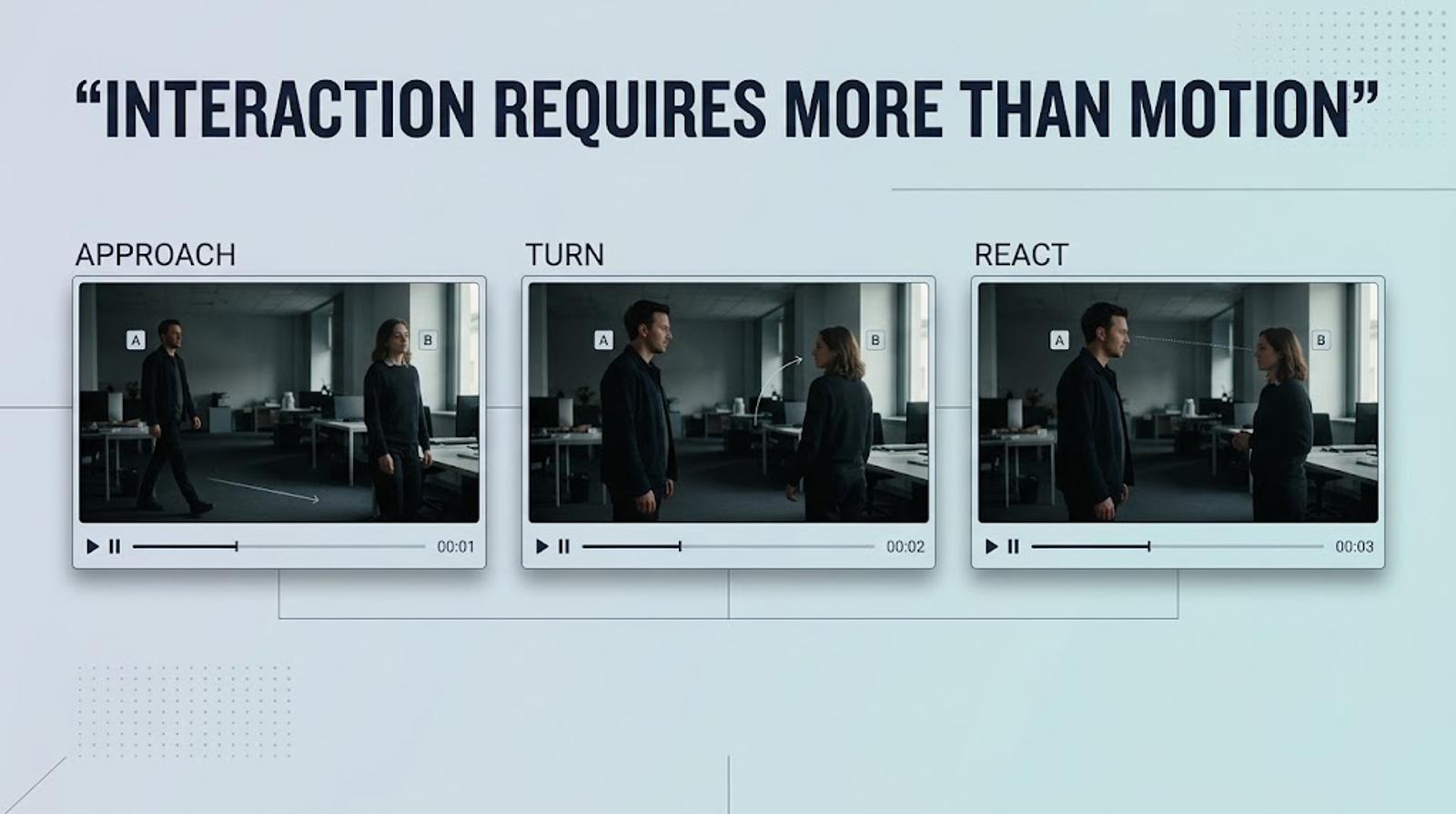
Test Result
The multi-character interaction was noticeably harder to keep consistent than the single-character motion.
The biggest problems appeared around:
Action order.
Character spacing.
Eye lines.
Body positioning.
That gave me a very practical conclusion:
For multi-character scenes, don't focus only on copying motion.
What makes two characters feel like they are actually interacting is:
Spatial relationships + eye lines + timing + reactions.
So if I'm making an AI comic and a complex two-person shot isn't working, I wouldn't immediately keep adding more prompt instructions.I would probably:
Break the shot down.
Generate A's reaction.
Generate B's reaction.
Then use editing to construct the interaction.
Because real filmmaking doesn't require every piece of information to be solved inside a single generation.
Test 4B: One Reference Doesn't Have to Do Everything
At this point, I started thinking about Reference differently.
A single video might contain:
Motion
Timing
Camera
Composition
So it is really:
A collection of cinematic information.
That means the question becomes:
Can I tell H3 which part of that information I actually want?
For example:
Use Video 1 for character movement and timing.
Or:
Use Video 1 for camera movement and pacing.
The source material stays the same.What changes is:
The role I'm assigning to it.
Test Result
This approach gave me more control than simply writing:
“Use Video 1 as a reference.”
And this is also consistent with the way MiniMax's official Reference Guide describes the system. It explains that Video Reference can contribute elements such as camera movement, cuts, rhythm, and temporal structure, while reference subjects can be used to define specific visual elements.
In other words:
One Reference can contain multiple kinds of information, but I need to be clear about which layer I want to use.
Test 5: In the End, I Stopped Trying to “Copy a Film” and Started Extracting Its Cinematic Language
By this point, I didn't think there was much value in continuing to test:
“How similar can the action look?”
That wasn't the question I actually cared about anymore.
I wanted to run one final test that was closer to a real AI filmmaking workflow.
The shot:
A girl is standing on a street.
She hears something.
She pauses.
She turns around.
She sees someone.
The camera slowly pushes in.
The conventional approach would be to find:
A complete reference video of a girl standing on a street and turning around.
But this time, I didn't.
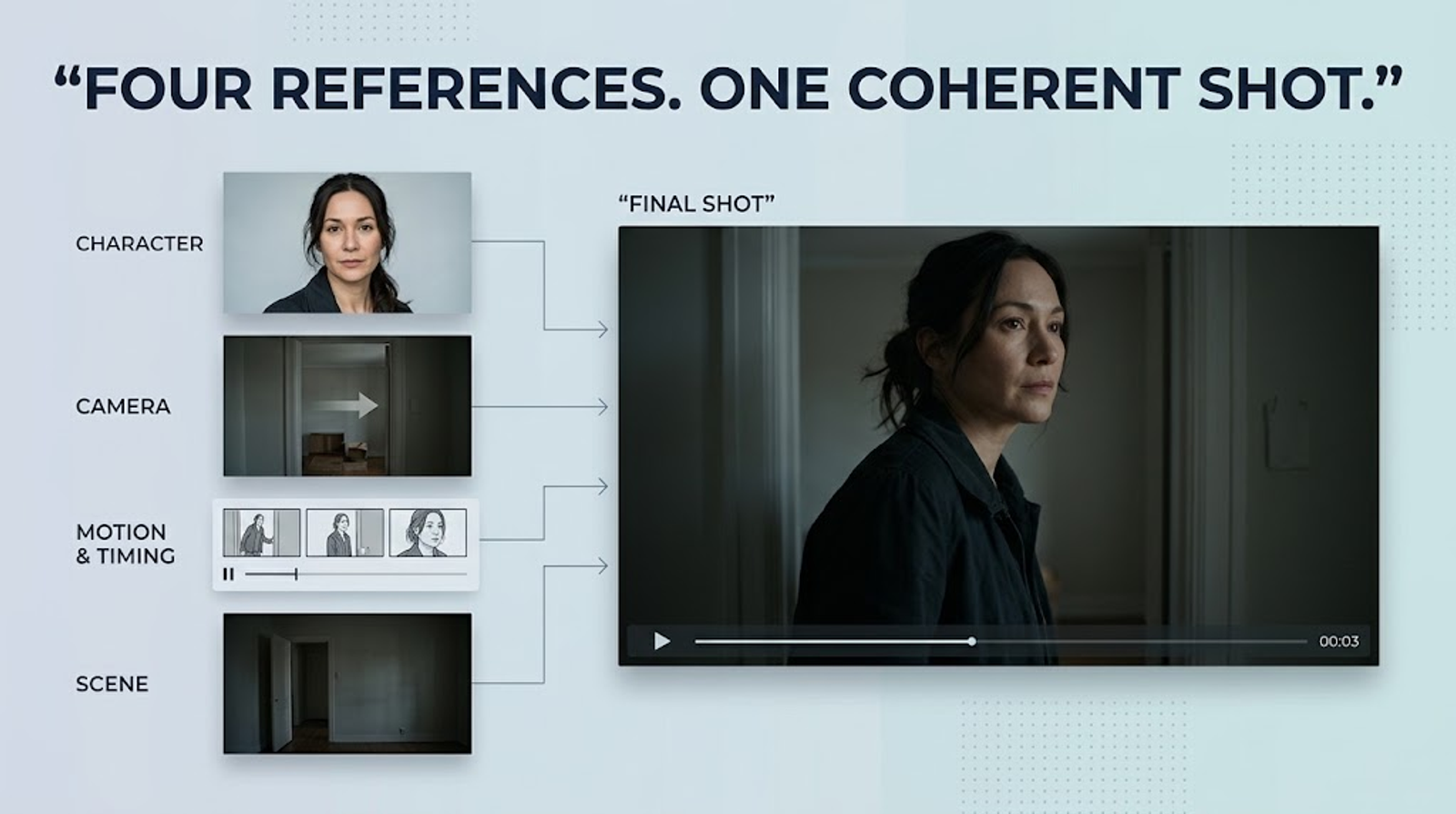
I broke the shot into separate pieces.
Character: I Only Need to Define Who She Is
I use an Image Reference.Its job is:
Character Identity.
I want to make sure:
This is the same character.
Camera: I Only Need to Define How the Shot Is Filmed
I use a Video Reference.Its job is:
Camera Movement.
I don't care who is in the reference.
I don't even care where the scene takes place.All I need is:
Slow Push-In.
Motion + Timing: I Need to Define How the Character Reacts
I use another Video Reference.
Its job is:
Motion + Timing.
What I actually need is:
Hear something → pause → turn around.
Not the original character.
Not the original environment.
Not the original story.
Prompt: I Decide the Story
The prompt handles:
The environment.
Character relationships.
Emotion.
Story.
Overall visual direction.
At this point, the shot is no longer:
“I found a reference video and asked H3 to copy it.”
It becomes:
“I broke the shot into several layers of cinematic language and gave each layer to H3.”
That's the Reference workflow I find much more useful for AI filmmaking.
What I Learned: How to Use Reference More Like a Filmmaker
Cinematic Feeling May Not Come From One Feature
By the end of this test, I realized that this wasn't really just a MiniMax H3 tutorial anymore.
I started with a simple question:
Can Reference transfer motion?
But what I actually ended up exploring was:
Can Reference help me deconstruct a cinematic shot?
A single video may contain:
- Character movement
- Camera movement
- Timing
- Pacing
- Composition
- Blocking
- Emotional rhythm
And I used to look at all of that and simply think:
“This is a great-looking shot.”
Now I try to break it down.I ask:
What exactly makes this shot work?
Is it the camera?The motion?
The pause?
The distance between the characters?
Or the exact moment when the camera starts moving?
You Don't Need to Master Every AI Video Feature to Make Better Films
This is probably the biggest lesson I took away from the whole test.
When people learn a new AI video model, they often try to learn every feature:
Reference.
Character Reference.
Camera Control.Style.
Audio.
And so on.
It feels productive because the list of features keeps getting longer.
But when they actually make a film, they often end up going back to:
Prompt + Generate.
Then they keep generating until something works.
I now think there's another way to approach it:
Being good at AI filmmaking doesn't necessarily mean knowing the most features.
It can mean:
Knowing how to push one feature much further than everyone else.
Reference is a good example.
If all you do is:
Upload a video → copy the motion.
It's useful, but it's not particularly deep.
But once you start breaking it into:
Motion Reference.
Camera Reference.
Timing Reference.
Pacing Reference.
Blocking Reference.
Composition Reference.
Even:
Emotional Reference.
It becomes a very different tool.You're no longer just:
Using a feature.
You're using one feature to solve increasingly specific filmmaking problems.
If I Were Making an AI Film, This Is How I'd Look for References
After all these tests, I'd summarize the workflow like this:
| Problem I'm trying to solve | Reference I'd look for |
| Character movement feels stiff | Motion Reference |
| Camera feels generic | Camera Movement Reference |
| The shot lacks rhythm | Pacing Reference |
| Character reactions happen too quickly | Timing Reference |
| The emotion feels flat | Emotional Timing Reference |
| Two characters don't interact naturally | Blocking / Interaction Reference |
| Composition feels too “AI-generated” | Composition Reference |
| The shot lacks tension | Framing + Camera Reference |
| Character identity keeps drifting | Character Reference |
| I don't know how to shoot the scene | Storyboard / Shot Reference |
This also changes the way I search for Reference material.
Before:
“I need to find a video that looks similar to my shot.”
Now:
“What is missing from my shot?”
Then I look for that specific thing.
The two questions may sound almost identical.
They aren't.
One More Thing: Your Reference Doesn't Need to Be as Similar as Possible
There's one final point I think is worth emphasizing.
If you're using a movie scene you really like as a Reference, the most useful question isn't:
“Can H3 reproduce this more accurately?”
It's:
“What exactly am I trying to take from it?”
If the answer is:
Camera Movement.
Great.
If it's:
Motion Logic.
Also useful.
If it's:
Timing and Pacing.
That can be even more valuable.
But if you start copying:
Character blocking + action sequence + composition + camera + performance + environment + pacing,
then you're getting much closer to reproducing a specific shot.
For someone making an original AI film, I think:
Borrowing cinematic language is much more valuable than copying a cinematic shot.
You can study:
Why does this shot feel tense?
Why does this character feel isolated?
Why does this camera movement create pressure?
Why does this pause make me expect something?
Then redesign:
The character.
The environment.
The movement.
The composition.
The story.
That's where the creative value comes from.
And if your Reference comes from a third-party film or other copyrighted work, you should also consider copyright and other third-party rights. Technical feasibility does not automatically mean that reproducing a specific creative work is legally or commercially safe.
So, Is MiniMax H3 Reference Actually Worth Exploring?
If the question is:
“Can H3 use Reference for motion transfer?”
My answer is:
Yes. And MiniMax officially documents Reference-to-Video and motion-related workflows as part of H3's capabilities.
But if the question is:
“Can Reference make my AI film feel more cinematic?”
My answer is more complicated.
Reference itself doesn't automatically make your footage cinematic.
What matters is:
Whether you can break cinematic quality down into things you can actually control.
A typical creator may watch a film scene and think:
“That shot looks amazing.”
A filmmaker starts breaking it down:
How does the camera move?
When does the actor move?
Why is there a pause here?
Why are these two characters standing this far apart?
Why doesn't the camera cut immediately?
Why does the camera start pushing in at that exact moment?
Those are the actual building blocks of cinematic language.
And that's where I think H3's Reference system becomes genuinely interesting.
It gives me a way to take information that was previously bundled together and start separating it.
Instead of:
“Reference this video.”
I can think:
“Reference the motion.”
“Reference the camera.”
“Reference the timing.”
“Reference the blocking.”
And then combine those pieces into a new shot.
So if you're making AI films right now, I wouldn't immediately recommend learning every hidden feature of H3.
I'd start with one film shot you genuinely love.
Don't generate anything yet.
Just ask:
What exactly do I like about this shot?
Is it the motion?
The camera?
The timing?
The composition?
The character relationship?
The emotional rhythm?
Break it down.
Then take just one element and use it as a Reference.
If that works, add another.
Then combine them.
That's a much more practical path, in my opinion, from:
“The AI generated something pretty good.”
to:
“This actually feels like a film shot.”
Because cinematic feeling doesn't come from one prompt, one model, or even one Reference.
It comes from control.
And MiniMax H3 Reference gives you another way to take control of your shots.