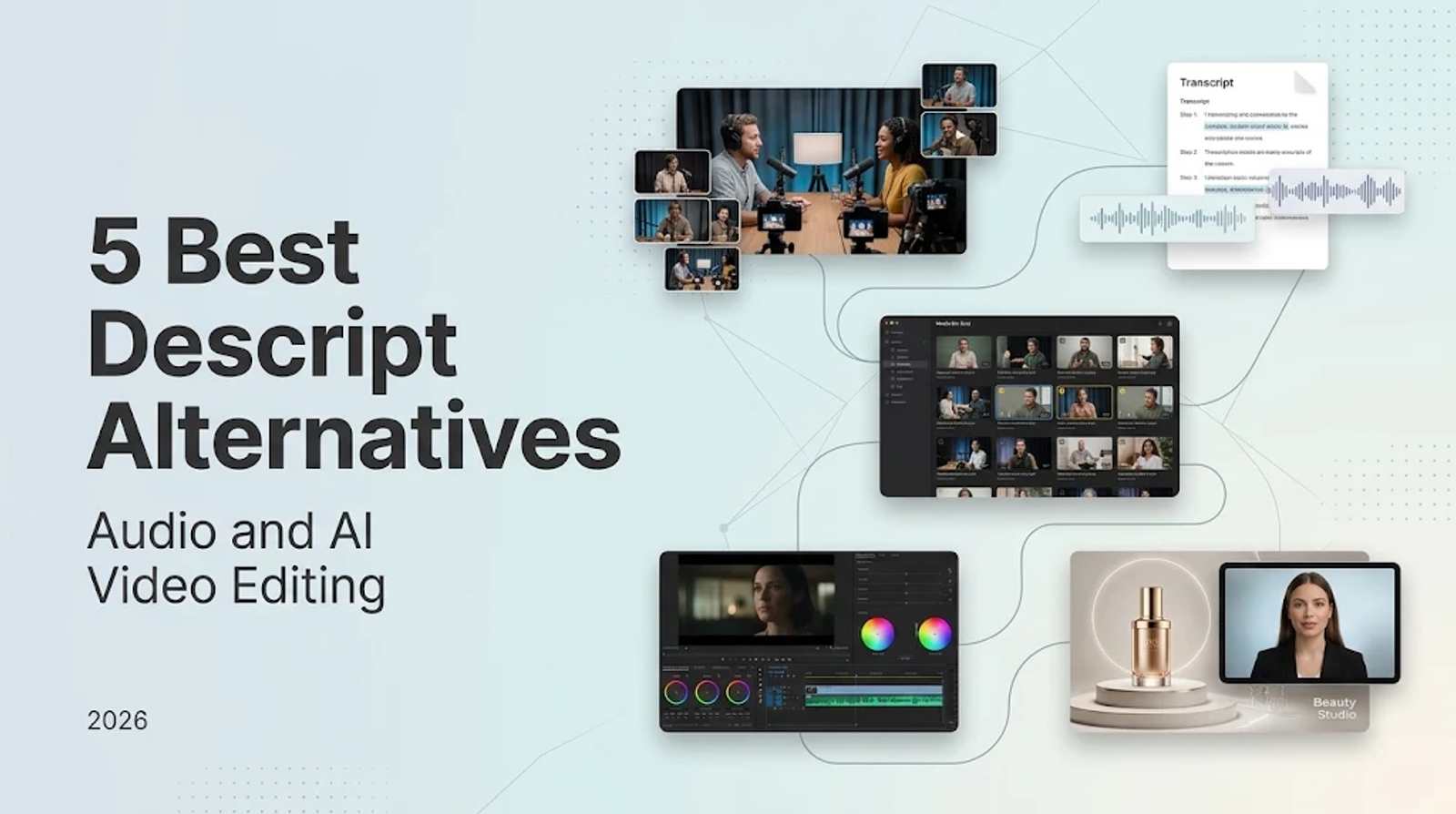
Riverside is the first Descript alternative I look to when a project begins with remote interviews and transcript-led editing. Reduct is built to isolate and assemble key quotes across hours of raw dialogue, while VEED combines transcript cuts with browser-first social video production. For deep color grading, dynamic audio mastering, and visual finishing, DaVinci Resolve remains the industry benchmark. Wizstar steps in during the content-generation stage: its Creative Agent and AI Avatar workflows transform scripts, prompts, product links, or reference stills into custom product scenes, narrated inserts, and speaking-presenter segments.
The right choice comes down to the exact production step you need to clear—remote capture, transcript rough cuts, advanced post-production, or net-new visual generation. Because Descript already bundles multi-track recording, text editing, AI assistance, and digital avatars into a single workspace, an alternative does not need to duplicate every tool. Evaluate each platform by the specific job it takes over, then confirm its format ceilings, usage allowances, and pricing structure.
Which part of Descript do you need to replace?
A software alternative can solve a specific production bottleneck directly without attempting to replicate an entire ecosystem. Splicing an interview via text, grading color and mastering dialogue, and generating synthetic video clips from scratch are distinct technical tasks requiring different tools.
The Descript baseline pairs local multi-track Rooms recording with its core transcript editor, digital avatars, and Underlord assistant. This comparison relies strictly on published specifications and documented plan terms rather than subjective render speeds.

| Platform | Main job | Editing approach | Place in the workflow |
| Descript | Record and edit spoken media | Transcript-linked edits | Baseline also includes assistance and avatars |
| Riverside | Record conversations | Transcript search, cut, copy, and paste | Direct: recording and transcript edits |
| Reduct | Assemble interview material | Transcript selections, reels, rough cuts | Direct assembly; partial full production |
| VEED | Make browser-based social videos | Transcript edits and rearrangement | Direct transcript edits; partial full production |
| DaVinci Resolve | Finish video and audio | Integrated desktop post-production | Partial: detailed finishing |
| Wizstar | Generate creative or avatar videos | Input-led planning and revisions | Scenario-specific: new content generation |
This distinction separates editing pre-recorded media from generating net-new video. That boundary is far more helpful than treating every tool with an AI feature as an interchangeable editor.
Riverside: keep recording and conversation edits together
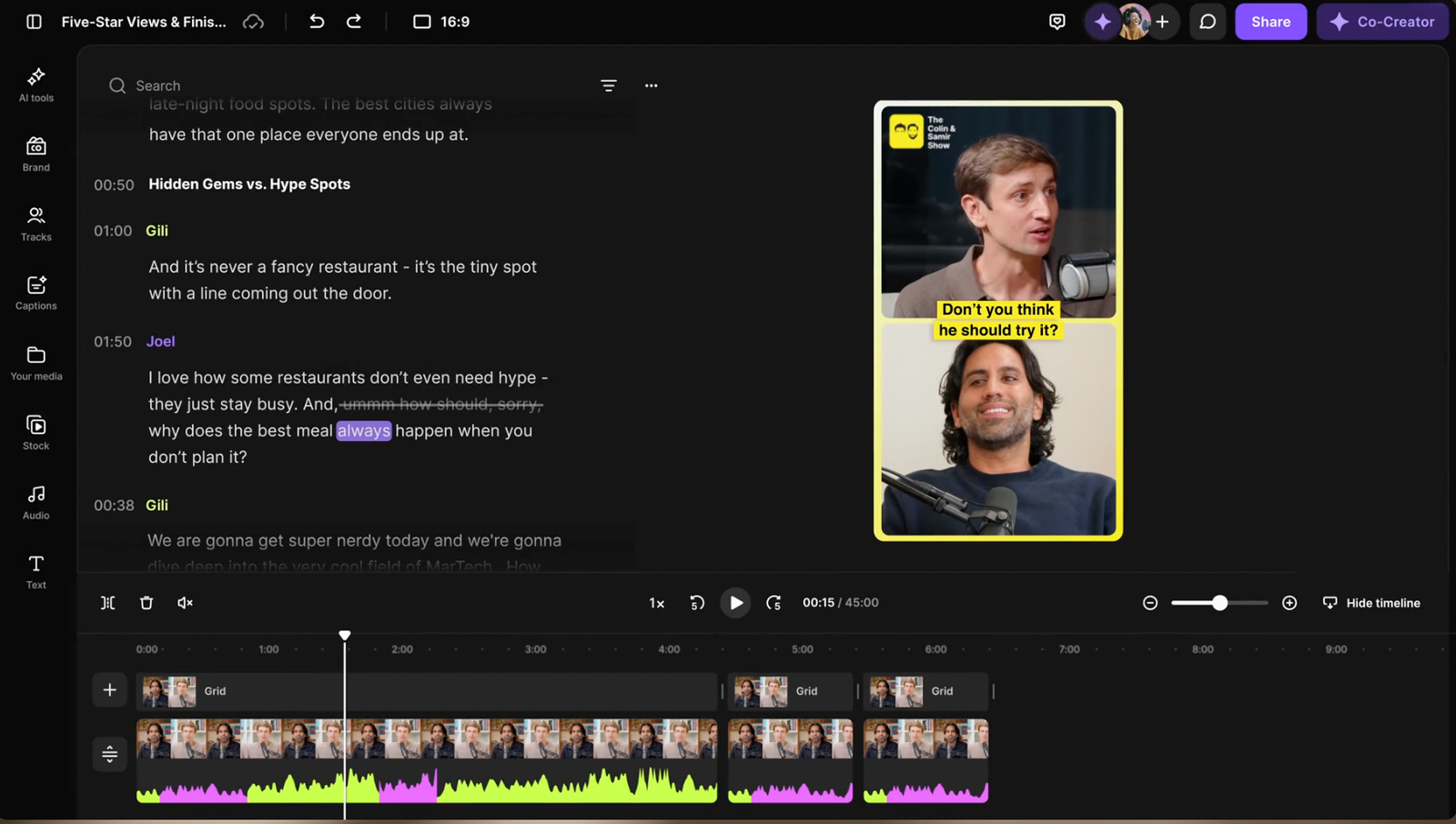
Riverside records separate local audio and video tracks at up to 4K resolution directly on each participant's device, then lets you search, cut, copy, and paste dialogue directly through an automated transcript. It links the remote capture session directly to the rough-cut stage, making it the most seamless starting point for podcast and interview workflows.
The operational advantage is workflow continuity. You can adopt Riverside for high-fidelity capture and rapid text rough cuts without requiring it to function as a full-scale finishing suite. Prioritize capture fidelity when remote interview recordings form the foundation of your deliverables. A tool that only handles post-production cannot fix a compromised recording setup.
Reduct: find the interview material worth keeping
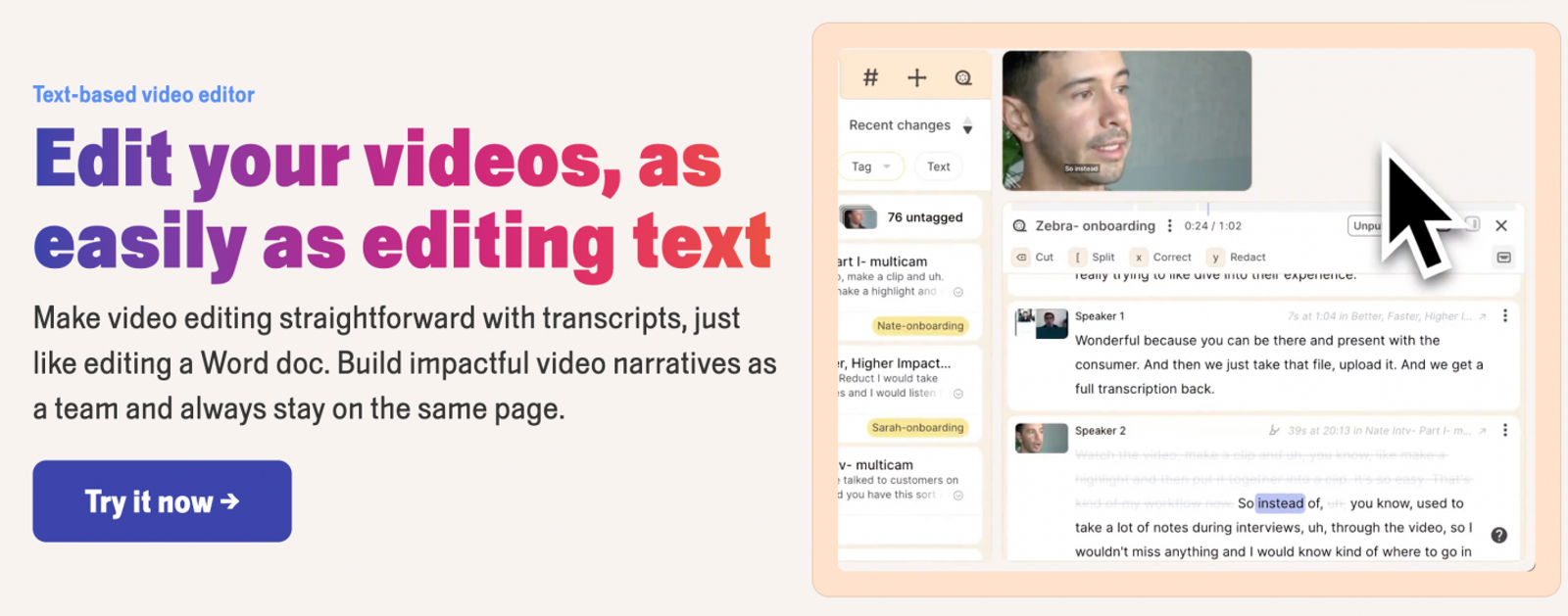
Reduct is engineered to help teams surface and organize spoken evidence across deep video archives. Transcript search, quote selections, highlight reels, and rough-cut storyboards lead directly into an XML or EDL export for professional non-linear editors. That makes it a direct fit for interview assembly, while leaving final finishing to specialized software.
LiveCapture connects to Zoom, Google Meet, and Microsoft Teams. However, those web meeting integrations do not by themselves constitute a dedicated studio-grade remote recording setup. Reduct’s primary strength lies in downstream analysis: finding key soundbites across hours of dialogue and assembling them into a narrative sequence.
For projects built around long research sessions or multi-hour interviews, that indexing capability solves the biggest editorial bottleneck. Choose Reduct when organizing spoken quotes is the primary hurdle, then maintain a clear handoff to your finishing editor.
VEED: edit social videos in the browser
VEED’s text-based editing updates the video timeline dynamically as you edit the text transcript. Highlight trimming, block rearranging, screen recording, webcam capture, AI generation tools, and digital avatars operate around this browser workspace.
This toolset fits social media managers and solo creators who produce talking-head videos directly inside a web browser. Text editing is embedded into an active social video canvas rather than isolated as a static document.
VEED is practical when zero-install browser convenience and social formatting are top priorities. Keep in mind that its built-in webcam and screen recorder should not be mistaken for a dedicated multi-guest remote studio pipeline.

DaVinci Resolve: bring the finishing work together
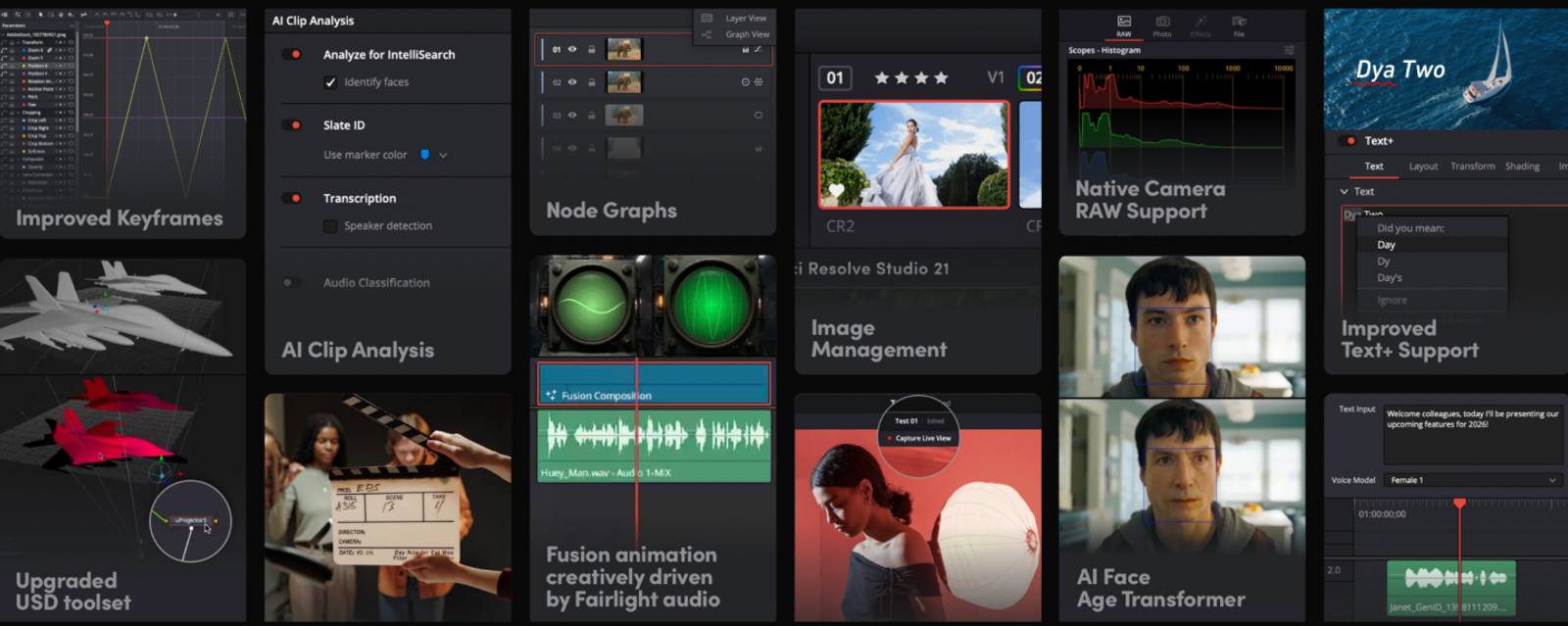
DaVinci Resolve 21 unites video editing, industry-standard color grading, Fairlight audio mastering, and Fusion visual effects in a single desktop workstation. It targets the production phase where a sequence demands meticulous finishing.
The reason to adopt Resolve is the depth of control available once narrative dialogue is locked. Color timing, visual cleanup, and dynamic range mastering belong alongside the picture edit. A transcript-based tool can easily handle initial dialogue assembly before exporting a timeline to Resolve.
Turn to Resolve when professional timeline control, advanced codecs, and audio mastering represent your main production requirements. Keep dialogue assembly and finishing handoffs as separate workflow steps.
Wizstar: a complementary option for adding AI-generated visuals
Descript can handle the recorded conversation, transcript edits, and core story structure. If the finished piece also needs a product scene, visual insert, narrated segment, or avatar-led explanation, Wizstar can extend that workflow rather than replace it. Its Creative Agent accepts a prompt, script, product link, or reference image and supports scene planning, voice, sound, editing, and revisions. Its avatar workflow can turn a photo or video into a speaking presenter driven by a script or uploaded audio.
This makes Wizstar a practical companion when Descript has already shaped the spoken content but the project still needs new visual material. For example, a creator could edit an interview or narration in Descript, then use Wizstar to create a product-focused insert or avatar segment for the final video. Wizstar does not replace Descript’s transcript editing or recording workflow; it fills the generative visual stage those workflows may leave open.

What do the plans cost—and what do you get?
| Platform and plan | Price and billing unit | Included usage | Output or purchase condition |
| Descript Creator | $35/person/month | 30 media hours/month; 800 AI credits/month | 4K, watermark-free exports |
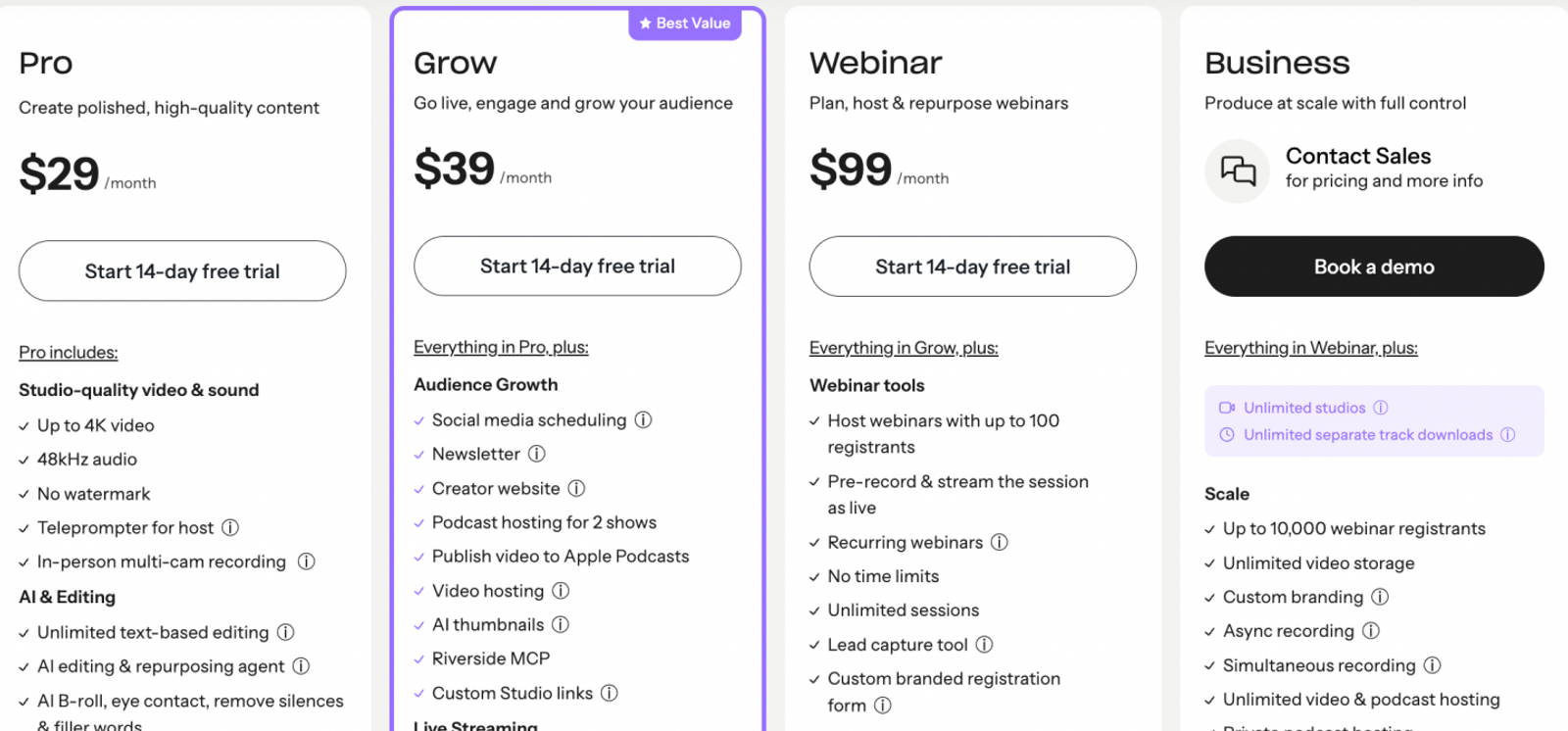
| Riverside Pro | $29/month | One studio; 15 hours of separate-track downloads | Unlimited recording; up to 4K desktop; no watermark |
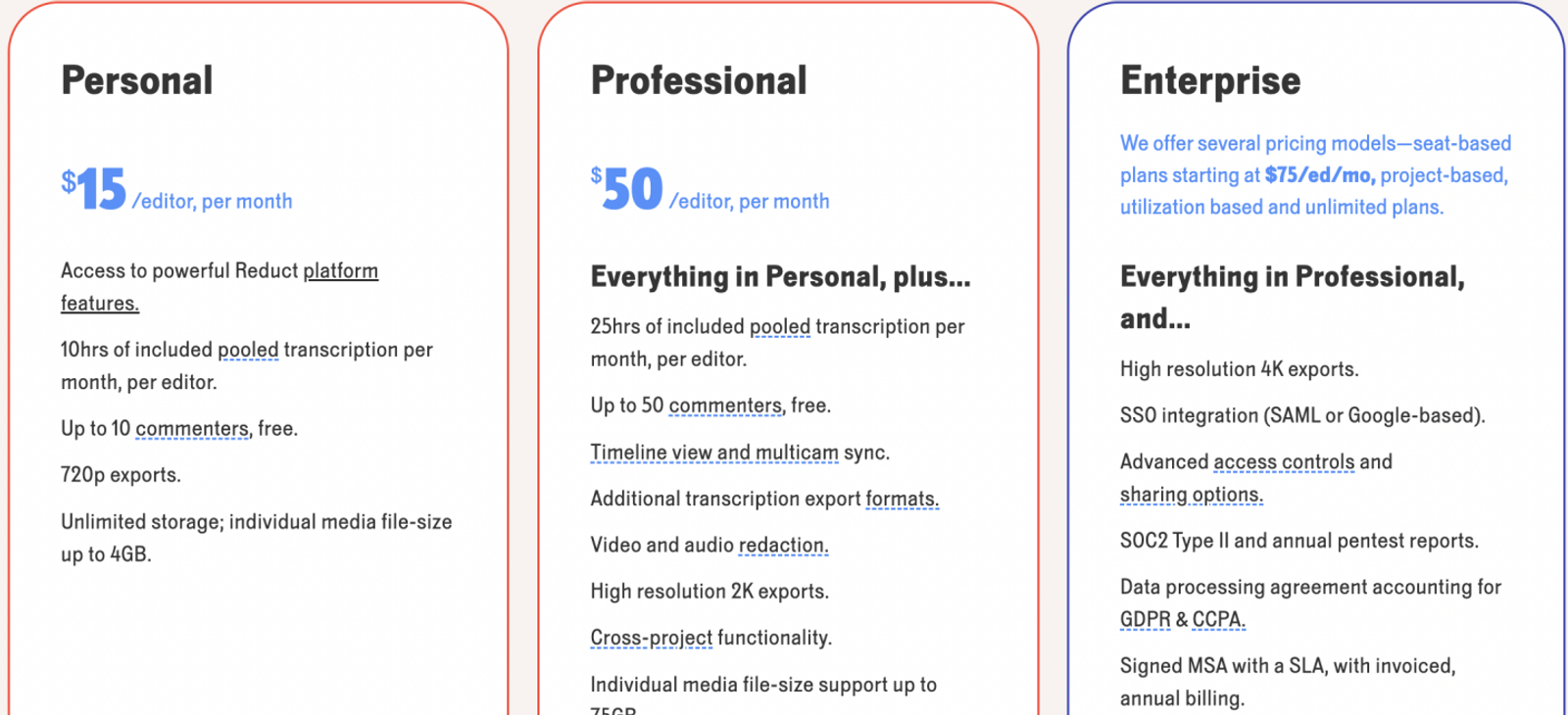
| Reduct Professional | $50/editor/month | 25 pooled transcription hours/month/editor | 2K exports; up to 75GB/file |
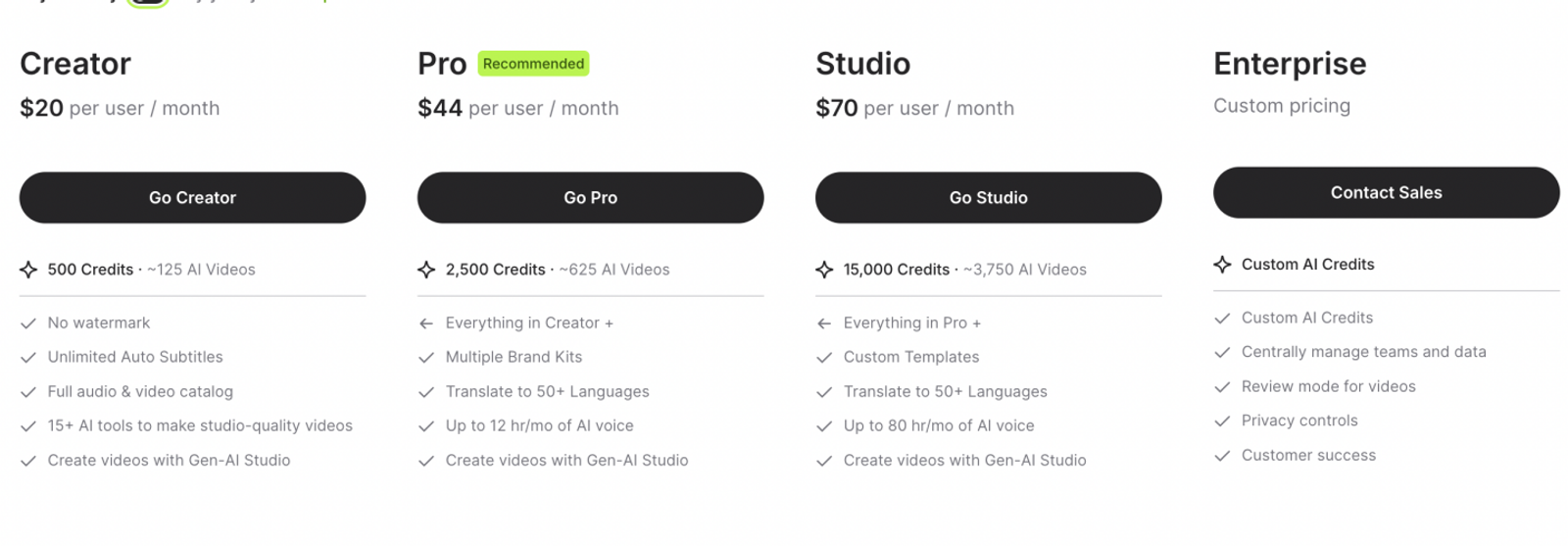
| VEED Creator | $20/user/month | 500 credits; 5GB storage | 1080p; unlimited export length |
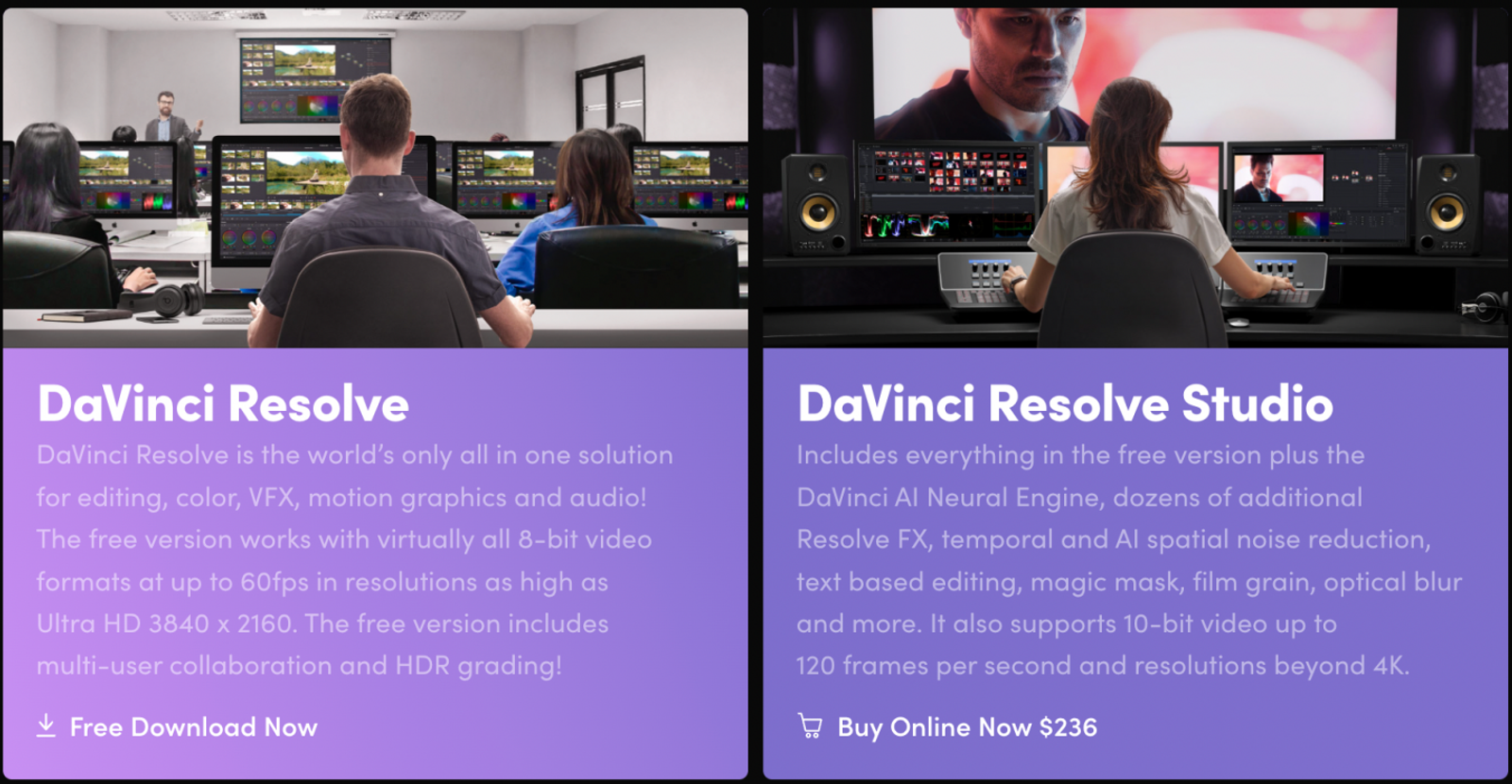
| DaVinci Resolve Free / Studio 21 | $0 / $236 displayed purchase price | Free finishing / Studio text-based editing | Studio: 20% off $295; duties included; sales tax/shipping excluded |
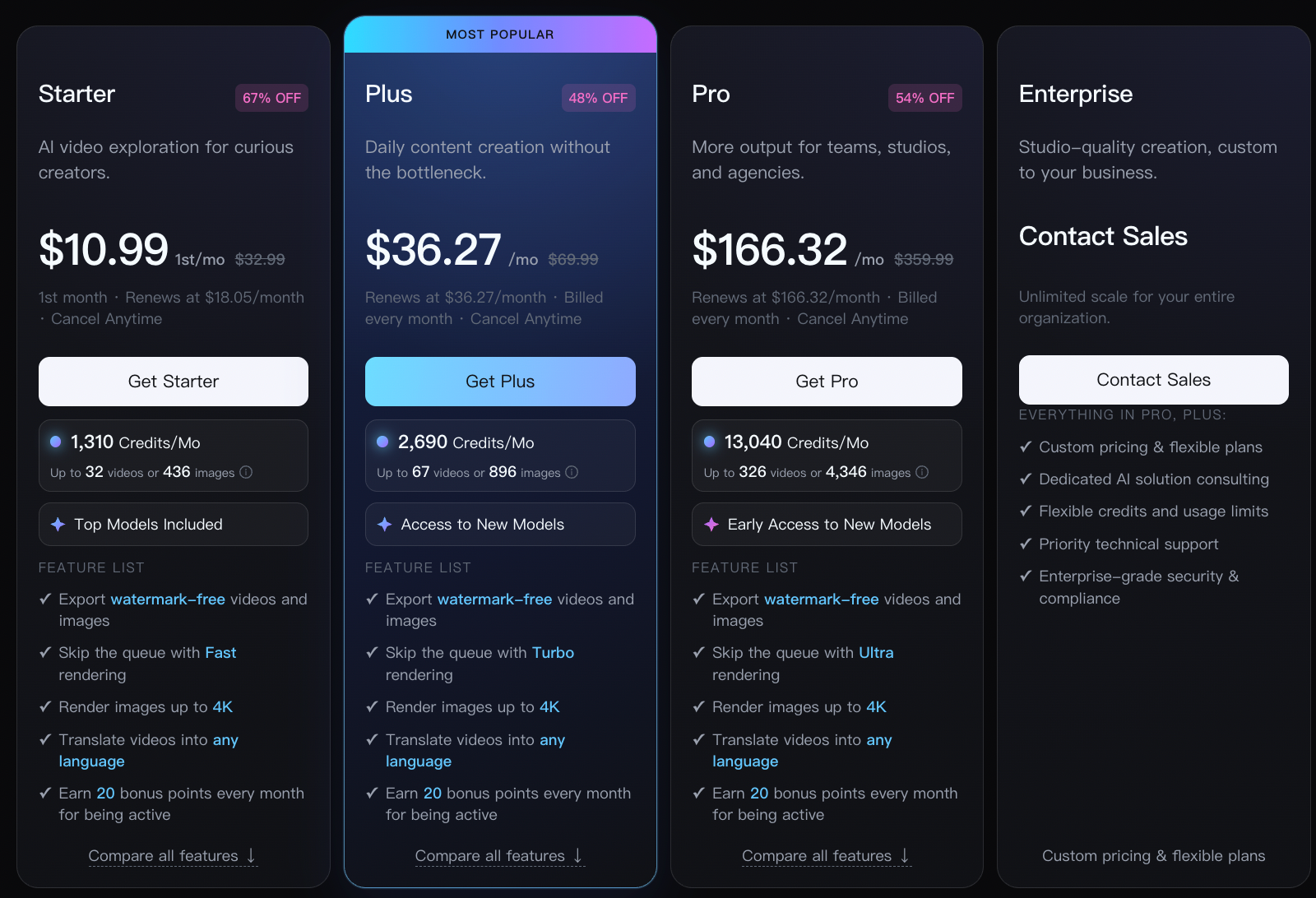
| Wizstar Starter | $18.05/account/month renewal | 1,310 credits/month | First month $10.99; Starter watermark status unconfirmed |
- Riverside Pro vs. Descript Creator:
For a solo creator recording interviews, Riverside Pro costs $6 less per month than Descript Creator while offering unlimited text editing and transcription. However, note the download ceiling: unlimited recording does not grant unlimited separate-track ISO downloads. That 15-hour boundary matters far more than the headline savings if you routinely download raw individual tracks for external mixing.
Matching to Lower Tiers:Riverside is not automatically cheaper than every Descript option. Descript Hobbyist costs $24 per person per month with 10 monthly media hours, 400 AI credits, and 1080p exports. If those limits cover your needs, Creator's 4K tier is not an essential starting point. Match your subscription to the tier you will actually use.
- Reduct Professional ($50/editor/month):
This seat covers transcript-based assembly, 2K exports, and shared team transcription pools. Evaluate its cost directly against that specialized interview indexing workflow. A lower-priced generative tool does not offer superior value for organizing spoken evidence, because the platforms fund entirely different tasks.
- VEED Creator vs. Pro:
VEED Creator serves as the 1080p entry tier ($20/user/month with 500 credits). The Pro plan costs $44 per user per month with 2,500 credits and 4K output. That additional $24 monthly investment provides 2,000 extra credits and higher resolution. Upgrade only when you require that capacity, rather than overpaying by default.
- DaVinci Resolve Free vs. Studio:
Resolve’s free version supports 8-bit formats up to 60 fps at Ultra HD (3840×2160). Automated text-based editing belongs to Studio. Start with the free tier if its format capabilities meet your post-production needs, then budget for the Studio license if automated text rough-cutting is essential.
- Wizstar Starter vs. Plus:
Wizstar’s advantage is the workflow it supports: a creator can start with a prompt, script, product, or reference image and develop scenes, voice, sound, edits, and revisions in one creative path. Starter renews at $18.05 per account per month with 1,310 credits, making it a practical entry point for solo creators or a focused campaign. Plus costs $36.27 per account per month and includes 2,690 credits, giving larger campaigns more room for multiple scenes, revisions, and avatar or video generations. Credit use still varies by model, clip duration, and render quality, so neither plan guarantees a fixed number of finished minutes. Custom avatar and voice cloning require paid add-ons.
Choose the part of Descript you need to replace
Descript remains the better fit for recording and transcript-based editing.If your next project needs new visuals after the main edit is complete, try Wizstar’s Creative Agent or AI Avatar workflow. It can replace that content-generation step without requiring you to replace Descript’s recording and transcript-editing workflow.
Match Your Descript Alternative to Your Video Production Needs
Descript remains the benchmark for remote recording and transcript-driven dialogue editing. However, if your next project demands fresh visual scenes or speaking presenters once the rough cut is locked, explore Wizstar’s Creative Agent or AI Avatar pipelines. This lets you plug in generative assets directly where needed, without abandoning the recording and text-editing workflow Descript already handles best.
FAQ
- Do I need to enter a credit card to try Descript?
- No. Descript’s official documentation confirms that its free tier does not require a credit card at sign-up. The free plan provides 60 minutes of media processing per month, a one-time allotment of 100 AI credits, and 720p watermarked exports. The initial AI credits do not replenish monthly. This free entry point provides a practical way to test the core transcript editor before committing to a paid subscription.
- How does Descript use my media files, transcripts, and Descript project data?
- Descript stores active projects on cloud infrastructure. Data sharing for transcription model training is turned off by default, though this setting does not cover every media pathway. Digital avatar rendering may route through third-party infrastructure, and CustomVoice training samples can be processed for model refinement. Deleted projects are purged from active servers within 30 days. Manage these permissions independently rather than treating cloud storage as a single blanket policy.
- How do I cancel my Descript subscription?
- You can cancel an active Descript subscription directly from the billing section of your account settings. Canceling a recurring subscription and deleting an account profile are distinct administrative actions; closing an account does not automatically cancel an active billing cycle. Published pricing terms do not guarantee prorated refunds once a billing period starts. Review your active dashboard and terms before confirming cancellation.
- Do unused subscription credits carry over?
- For Wizstar, credit rollover rules and expiration dates depend on the specific account terms and checkout conditions tied to your purchase. Because terms vary across promotional tiers and standard plans, avoid budgeting around indefinite credit banking. Check your active plan dashboard to confirm stated expiration timelines before purchasing larger credit pools.
- What happens to the reference files I upload?
- Files uploaded to Wizstar may be transmitted to downstream model providers for AI processing. Published privacy documentation describes US-based servers, processing for service optimization, and retention periods aligned with operational purposes. Do not assume proprietary reference assets remain strictly isolated to a single project. Review the active privacy policy and secure necessary usage rights before uploading confidential or client assets.
- Can I use Wizstar videos commercially?
- Paid Wizstar tiers include commercial use rights, subject to standard terms of service. Creators must maintain full ownership of uploaded inputs and obtain written consent for any identifiable human likeness or voice. Legal rights for synthetic media outputs vary by jurisdiction, and standard service agreements do not provide blanket non-infringement warranties. Retain comprehensive records of your source permissions before publishing commercial client work.