The best Gencraft alternative depends entirely on the operational bottleneck slowing down your workflow. While Gencraft serves as an accessible starting point for everyday prompt-to-asset generation, scaling creators and marketing teams often outgrow its rigid feature set.
This guide compares five proven alternatives across core creative production needs: multi-model video routing, still-image motion passes, reference-guided visual composition, integrated audiovisual workspaces, and direct Adobe pipeline integration. Each breakdown analyzes where each tool excels, where its operational boundaries lie, and how to stress-test it before migrating your assets.
Quick Picks
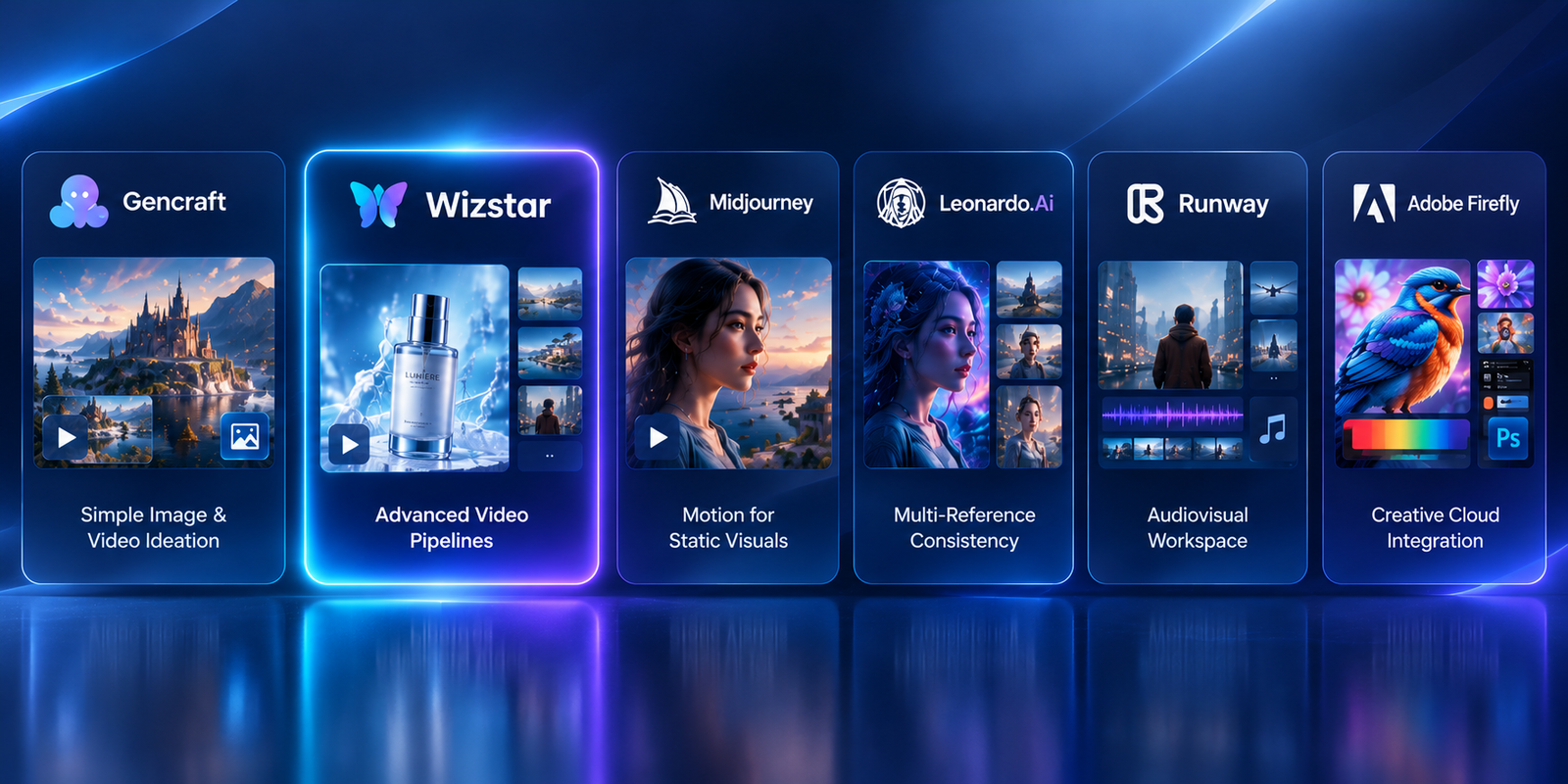
| Tool | Best For | Key Differentiator |
| Gencraft (Baseline) | Simple image and video ideation | Unified prompt-based generation via the Video Gen tab for casual workflows |
| Wizstar | Advanced video pipelines needing model choice | Granular text-to-video, image-to-video, and reference-to-video via leading foundational models (e.g., Seedance, MiniMax) |
| Midjourney | Adding clean camera motion to approved stills | 5-second initial clips extendable up to 21 seconds with Low/High motion toggles |
| Leonardo.Ai | Multi-reference visual consistency | Omni Image Guidance supporting up to six simultaneous reference inputs |
| Runway | End-to-end audiovisual campaign prototyping | Centralized generation workspace spanning video, images, voice synthesis, and sound effects |
| Adobe Firefly | Commercial workflows finishing in Creative Cloud | Native asset handoff into Photoshop and Adobe Express with commercial-safe training data |
Note:
Feature sets, compute credit allocations, and subscription tiers evolve frequently. Always consult live vendor pricing calculators before committing monthly budget.
When Does Switching Away from Gencraft Make Sense?
Before introducing new software to your stack, verify whether Gencraft genuinely fails your current brief. Its official documentation notes that subscribed users have dedicated access to the Video Gen interface. If your team only needs occasional, short single-prompt video clips, switching platforms may introduce unnecessary friction.
A migration becomes necessary when you encounter structural bottlenecks, such as:
Model dependency: Needing distinct rendering engines (e.g., photorealistic physics vs. stylistic character motion) within a single project.
Asset consistency: Requiring multiple reference images to control character identity, environment, and color palette independently.
Pipeline fragmentation: Juggling separate third-party tools for sound effects, ambient audio, voice tracks, and B-roll.
Storage governance: Gencraft’s retention policy limits free-tier asset storage to 30 days (Pro users retain lifetime access). If your workflow relies on retrieving past project iterations without manual local backups, long-term asset management becomes an issue.
Use your specific production bottleneck as the evaluation benchmark for the alternatives below.
Wizstar: Best for Multi-Model Video Routing and Cost Control
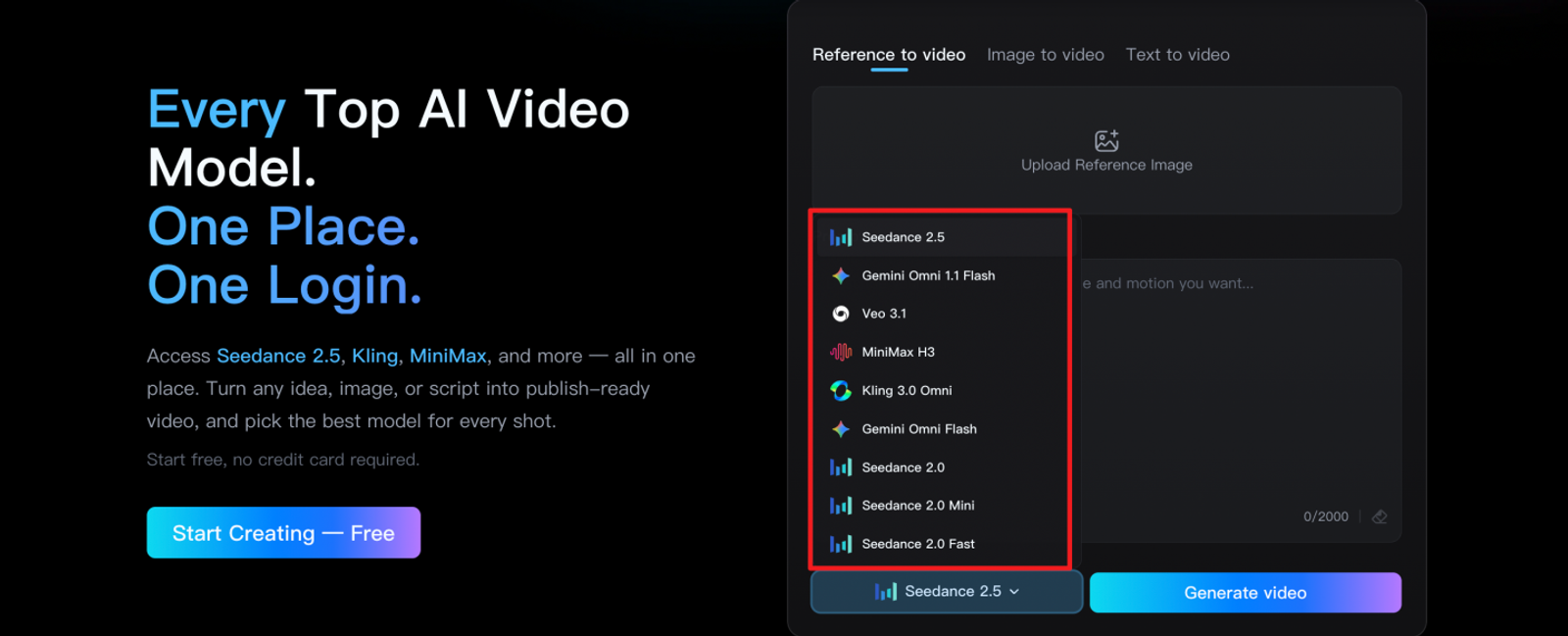
Wizstar is designed for video production workflows where selecting the underlying foundational model is critical to meeting creative direction. Rather than locking users into a single proprietary generation style, its AI Video suite provides flexible text-to-video, image-to-video, and reference-to-video capabilities across multiple top-tier models.
Key Capabilities and Production Workflow
Wizstar integrates leading industry video architectures—such as Seedance 2.0, Seedance 2.5, and MiniMax H3—under a transparent, usage-based credit structure. Credit consumption scales directly with the chosen model, output resolution, clip duration, and batch quantity. For example, rendering on Seedance 1.5 Pro requires 8 credits per second at 480p, while Seedance 2.5 runs at 16 credits per second at 480p.
This granular pricing architecture allows production leads to right-size generation costs: run rapid iterations and storyboards on lighter, lower-credit tiers, then switch to high-compute models for client deliverables.
Operational Considerations
Input Consistency: When evaluating outputs across different underlying models, keep the source prompt, aspect ratio, and first-frame reference identical to isolate rendering strengths.
Best Use Case: Choose Wizstar when your production pipeline requires fine-grained model routing, camera trajectory variety, and explicit cost-per-second control over every scene.
Midjourney: Best for Adding Motion to Approved Still Visuals
Midjourney remains an industry standard for visual fidelity, and its dedicated video feature provides a streamlined path for bringing high-concept still frames to life.
Key Capabilities and Production Workflow
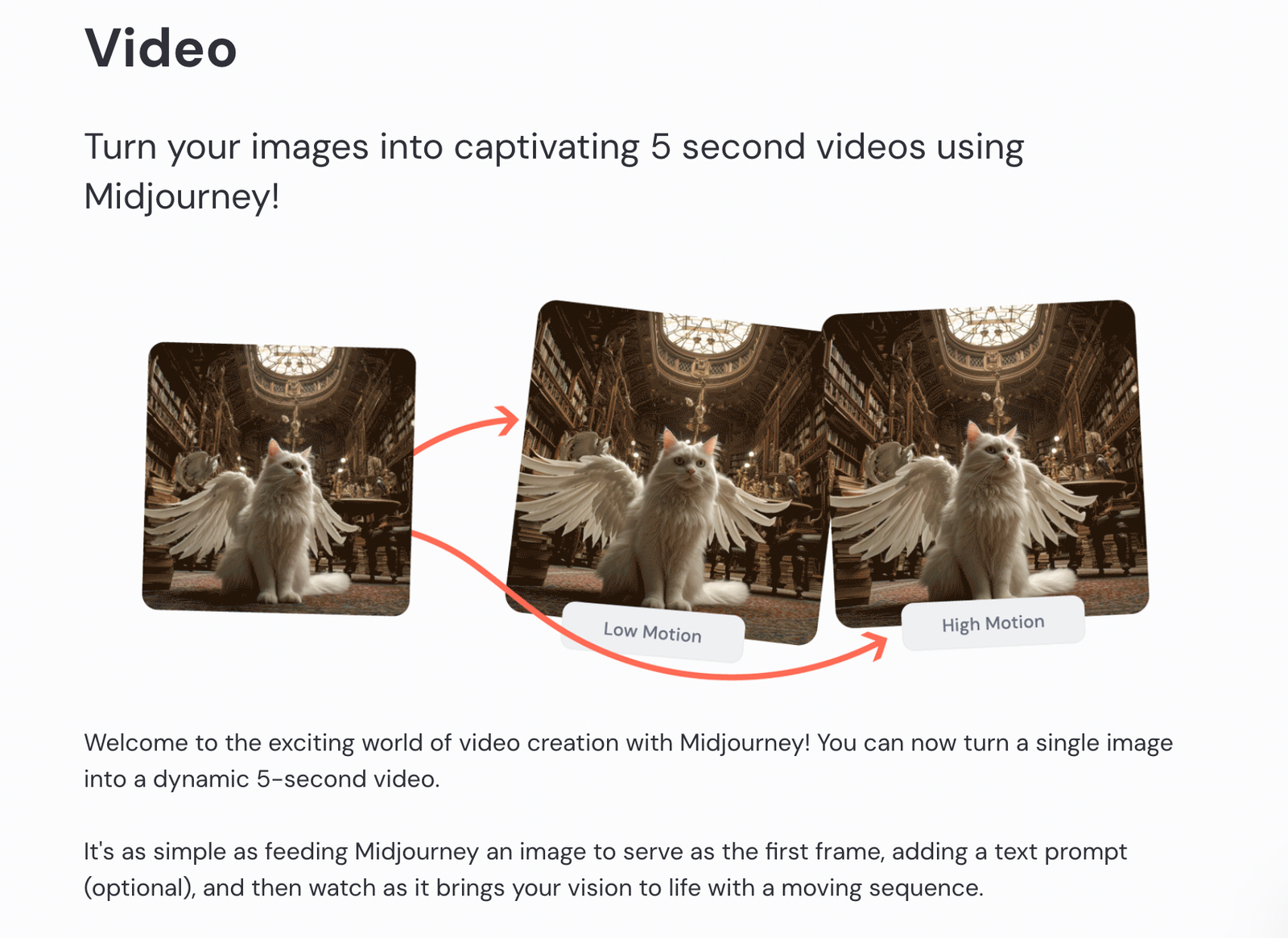
Midjourney approaches video not as an open-ended timeline editor, but as an animation extension of an approved still image. The workflow begins by generating or selecting an upscaled image, then rendering a 5-second animation pass. You can extend these clips iteratively up to 21 seconds while selecting between Low Motion and High Motion presets.
Low Motion: Ideal for subtle environmental atmospherics, such as moving cloud cover, drifting steam, or smooth camera push-ins.
High Motion: Suited for dynamic character movement, dramatic pans, and rapid scene transitions.
Operational Considerations
Frame Coherence: Always inspect the full duration of the clip. Look closely at human hands, typography, and edge geometry, which can drift over extended durations.
Timeline Boundaries: Midjourney does not offer timeline audio or multi-track sequencing, but it supports built-in looping. If your deliverable requires seamless social loops, inspect the transition between the head and tail frames in external editing software.
Best Use Case: Choose Midjourney when you already have approved keyframes and need short, cinematic motion passes without complex timeline setup.
Leonardo.Ai: Best for Reference-Guided Composition and Concept Art
Leonardo.Ai excels in multi-asset concept generation where natural language prompts alone fail to articulate complex spatial layouts or aesthetic styles.
Key Capabilities and Production Workflow
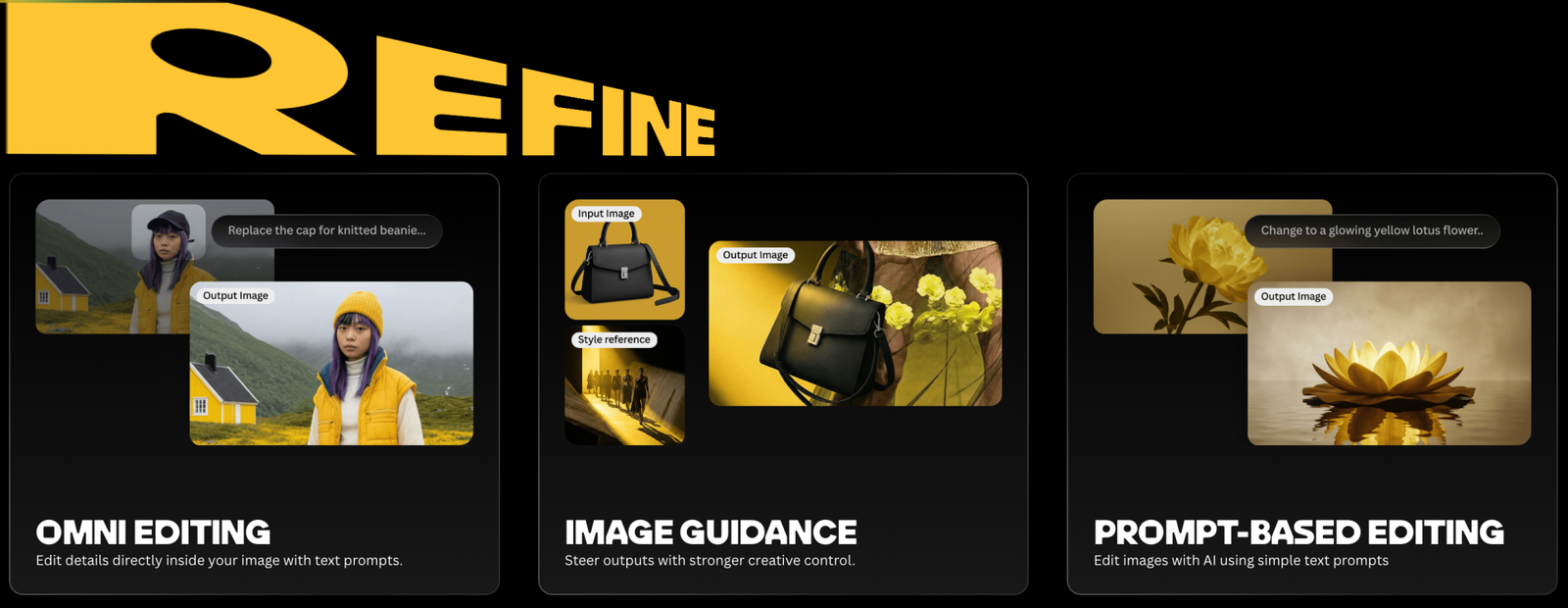
Leonardo’s Omni Image Guidance engine allows creators to ingest up to six simultaneous reference inputs to govern a single output. This enables modular creative prompting by assigning each reference image a dedicated structural role:
Reference 1: Character pose and facial structure
Reference 2: Architectural environment and background layout
Reference 3: Lighting direction and color grading palette
Prompt Example:
"Place the character from [Image 1] into the industrial interior from [Image 2], adopting the cinematic warm lighting and color contrast of [Image 3]. Keep wardrobe styling consistent with [Image 1]."
Operational Considerations
Framework Separation: Distinguish modern Omni Image Guidance from legacy ControlNet workflows inside the platform; each toolset handles mask constraints and edge detection differently.
Fine-Detail Verification: Multi-reference blending does not guarantee pixel-exact identity retention or typographic accuracy. Always check brand logos and facial features before passing assets downstream.
Best Use Case: Choose Leonardo when visual consistency, art direction control, and modular style transfer take priority over video generation.
Runway: Best for End-to-End Audiovisual Campaign Prototyping
Runway provides a complete generative sandbox, bridging the gap between standalone media generation and full timeline assembly.
Key Capabilities and Production Workflow
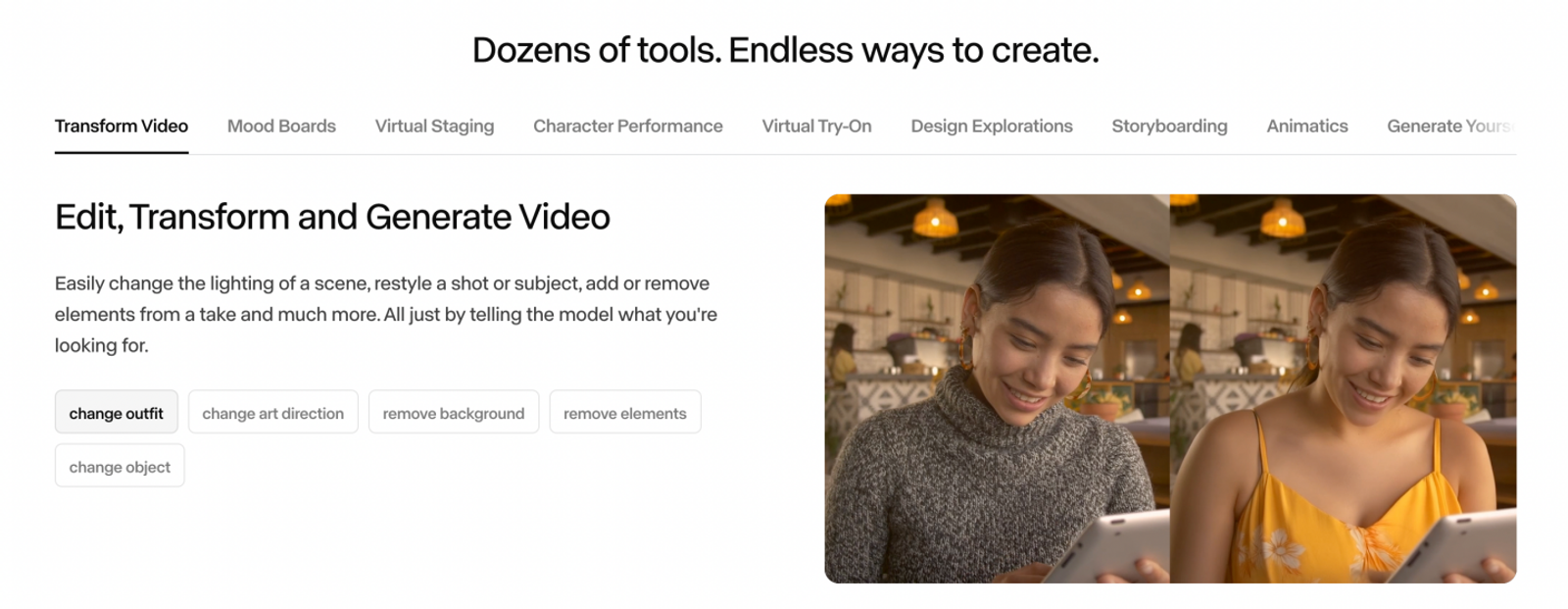
The Runway Creative platform unifies video generation (e.g., Gen-4.5), image synthesis, voice cloning, AI music composition, and clean Foley/sound effect generation inside a single collaborative workspace.
This unified environment eliminates the friction of moving visual files into separate audio generators. Creative teams can draft an opening hook, generate matching ambient soundscapes, layer in synthetic voiceover, and align scene cuts without leaving the browser.
Operational Considerations
Credit Expiration Policies: Runway’s Free tier provides 125 non-replenishing credits for testing. On Standard and Pro tiers, monthly subscription credits do not roll over. However, the Max tier allows carrying unused credits forward for up to one month, and separately purchased top-up credits do not expire.
Production Scope: Runway is built for multi-shot narrative drafting. Using it purely for one-off image crops or isolated animations underutilizes its timeline and audio capabilities.
Best Use Case: Choose Runway when your campaign demands synchronized video, synthetic voice, and custom sound design built within a cohesive creative environment.
Adobe Firefly: Best for Enterprise Workflows Finishing in Creative Cloud
Adobe Firefly is designed specifically for production pipelines where AI-generated content serves as an intermediate layer rather than the final deliverable.
Key Capabilities and Production Workflow
Rather than competing solely on raw standalone generation, Firefly’s value lies in its native interoperability with Photoshop, Illustrator, and Adobe Express.
Creators can generate base compositions or use Generative Fill directly on active canvas layers. This allows designers to keep critical brand assets, vector logos, body copy, and UI elements on isolated, editable layers, avoiding the pixel distortions typical of all-in-one AI rendering.
Operational Considerations
Workflow Boundaries: Firefly prioritizes commercial safety, asset cleanliness, and seamless round-tripping into Photoshop over radical, highly experimental video rendering.
Licensing and Layering: Verify your Creative Cloud plan entitlements. Firefly outputs easily transition into Photoshop. Generative Fill creates a new generative layer, while Illustrator can generate vector graphics.
Best Use Case: Choose Firefly when commercial safety, brand compliance, and direct handoff into standard graphic design pipelines are non-negotiable.
How to Stress-Test an Alternative Before Migrating
Avoid switching tools based on showcase demo reels. Run a controlled production test using the exact asset that caused friction in Gencraft:
Standardize the Brief: Use the exact same prompt, aspect ratio, reference image, and target duration across all candidate tools.
Account for Architectural Differences: Keep in mind that seed reproducibility, motion strength, and aspect-ratio scalers behave differently across underlying model architectures.
Evaluate against Three Quality Gates:
- Prompt Adherence: Did the output honor spatial and stylistic constraints on the first pass?
- Iteration Overhead: How many generations and compute credits were burned before achieving a usable asset?
- Downstream Cleanup: How much manual inpainting, color correction, or timeline editing is required before delivery?
Summary and Recommendation
If Gencraft’s unified Video Gen tab currently fulfills your creative briefs without operational friction, stay put. The best platform is the one that eliminates rework while maintaining your creative velocity.
Select your replacement tool based on where your production pipeline currently breaks:
For cinematic motion from keyframes: Choose Midjourney to apply stable, short-duration camera passes to existing high-fidelity visuals.
For rigorous aesthetic and character consistency: Choose Leonardo.Ai to direct lighting, character, and setting across up to six simultaneous visual references.
For full campaign asset assembly: Choose Runway to prototype video cuts, synthetic speech, and sound design within a single cloud workspace.
For enterprise asset governance and graphic handoff: Choose Adobe Firefly for clean integration into Photoshop and Adobe Express pipelines.
For maximum video flexibility and cost control: Choose Wizstar to leverage targeted model selection (Seedance 2.5, MiniMax) tailored to your scene requirements and credit budgets.
Note on Feature Sets & Pricing:
Product specifications, model availability, credit consumption, and subscription terms change frequently. Verify current limits, commercial licenses, and live pricing directly on each vendor’s official site before purchasing.
FAQ
- Can I use Gencraft creations commercially?
- According to Gencraft’s commercial licensing documentation, active paid subscribers receive commercial usage rights for qualifying images generated during their subscription term, provided they comply with the platform's Terms of Service. These commercial rights persist for those specific images even after subscription cancellation. Creations made on the free tier are strictly restricted to non-commercial use. Note that this policy applies explicitly to image generation; check current terms for video asset licensing.
- How long does Gencraft store generated files?
- Gencraft’s data retention policy grants Pro subscribers lifetime cloud storage for their creations, whereas free-tier user assets are retained for 30 days and may be removed at any time after that period. Always export and maintain local archives of critical campaign files regardless of tier.
- How does Wizstar handle video credit pricing?
- Wizstar uses a granular, consumption-based credit system based on the selected foundation model and output resolution. Compute costs are billed per second of generated video; for example, Seedance 1.5 Pro runs at 8 credits/second at 480p, while Seedance 2.5 costs 16 credits/second at 480p. Production teams should calculate expected generation lengths and factor in testing iterations when planning budgets.
- Do Runway generation credits roll over each month?
- Monthly credits on Runway’s Standard and Pro plans do not roll over and reset at the end of each billing cycle. Subscribers on the Max plan can roll over unused credits for up to one month. Any additional credit packs purchased outside the subscription plan do not expire.