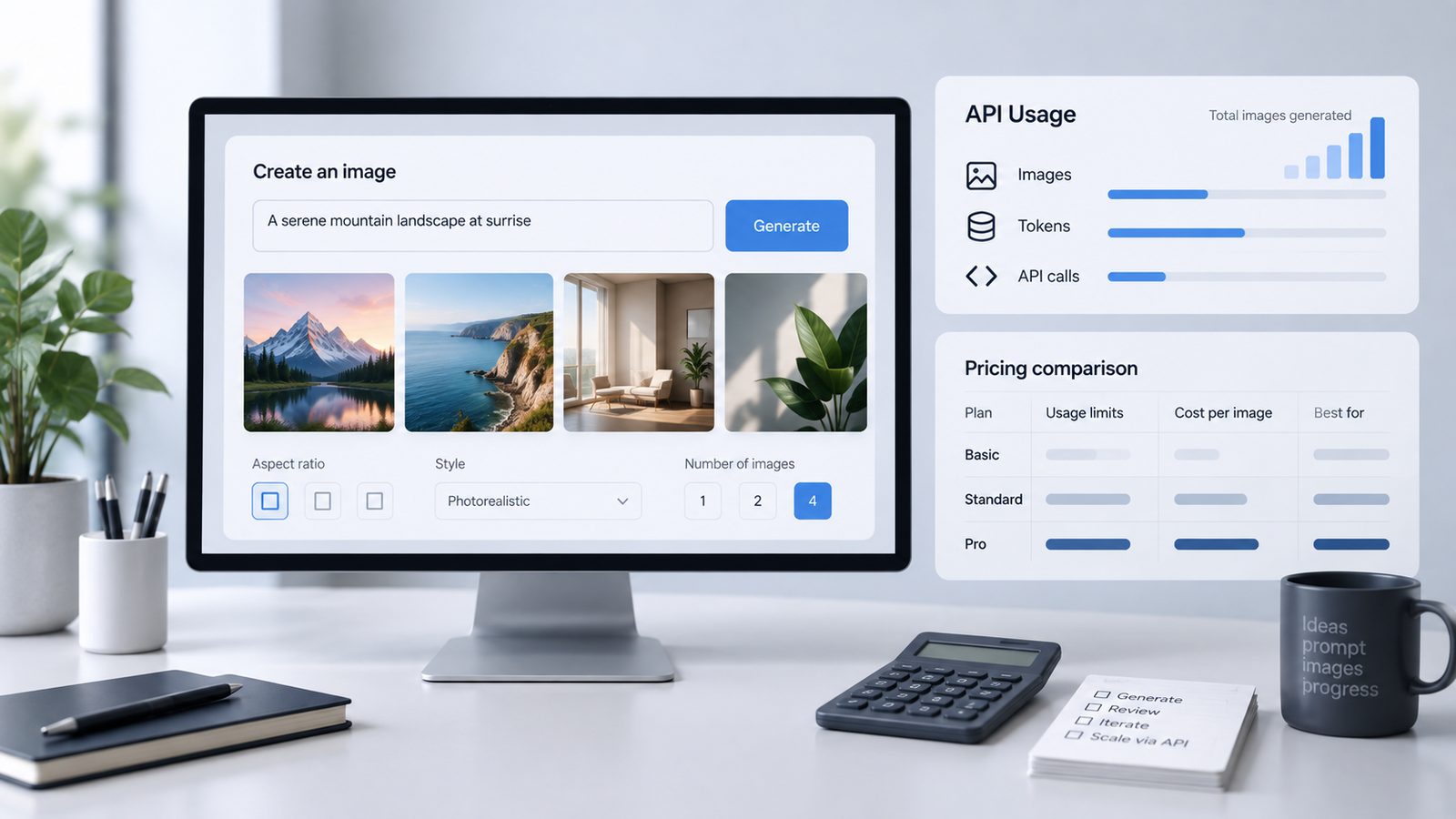
GPT Image 2.5 API image output costs $30 per million tokens, but this is not the price of one image. Your total depends on the number of tokens in your request. This can include your text and any reference images. In ChatGPT, image creation depends on your plan's usage limits, not API token charges.
OpenAI's official pricing lists these prices. Below, you will see a simple example, what the calculator does not include, and which settings can change your bill.
A few terms will help:
- API: A way for an app or website to use the model.
- Request: One call to the API, such as asking it to create or edit an image.
- Tokens: Units used to measure the text and image data the model handles. They are not the same as image counts.
- Input and output: Input is what you send, such as a prompt or photo. Output is what the model creates.
- Cached input: Input the service has saved and can reuse at a lower rate when it meets the caching rules. Sending the same input again does not always mean you get this discount.
What Does GPT Image 2.5 Cost in ChatGPT?
If you create images in ChatGPT, API token prices do not apply. What matters is your ChatGPT plan and its image limits.
The Images in ChatGPT documentation says ChatGPT Images is available on all plans. The ChatGPT Free Tier FAQ says image creation has its own limits. ChatGPT will tell you when you reach one.
So, you do not need to work out token costs when you create an image in ChatGPT. You only need to stay within your plan's limits.
GPT Image 2.5 API Rates
OpenAI offers two GPT Image 2.5 API models:
- Flare: Made for fast, high-quality image creation.
- Sunburst: Made for harder creation and editing tasks, especially tasks that need careful edits.
For model details, see the GPT Image 2.5 Flare documentation and GPT Image 2.5 Sunburst documentation.Both models have the same published token rates:
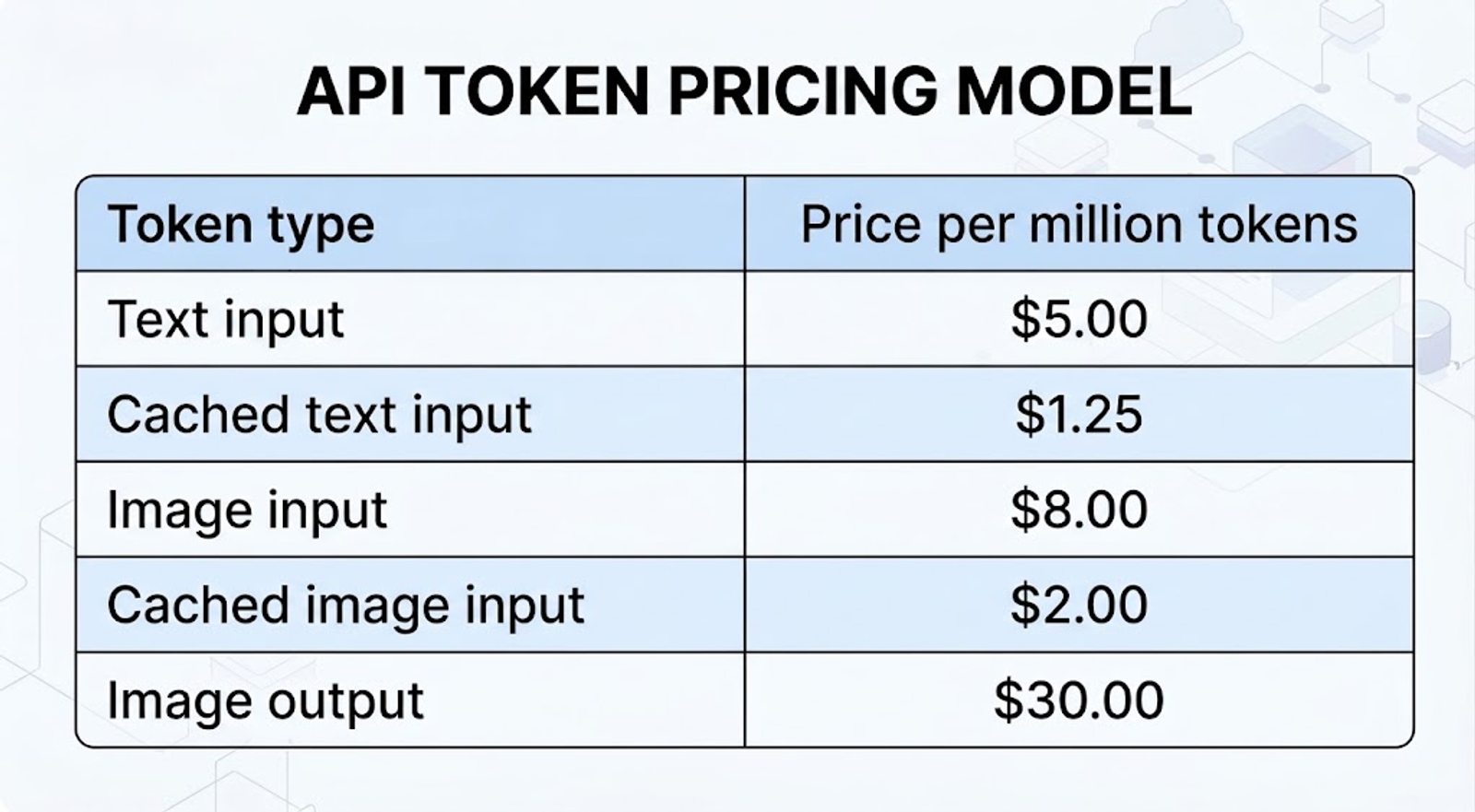
Source: OpenAI's API pricing documentation.
The API charges by token use, not a fixed price per image. $30 per million image output tokens does not mean one image costs $0.03. Your bill includes the tokens used to make the image and any input tokens you are charged for.
How to Calculate the Cost of a Request
To work out the image part of a request, multiply the tokens in each category by its price. Then add the results. Cached tokens have a lower price than normal input tokens, so do not count them twice.
Here's an example with no cached inputs:
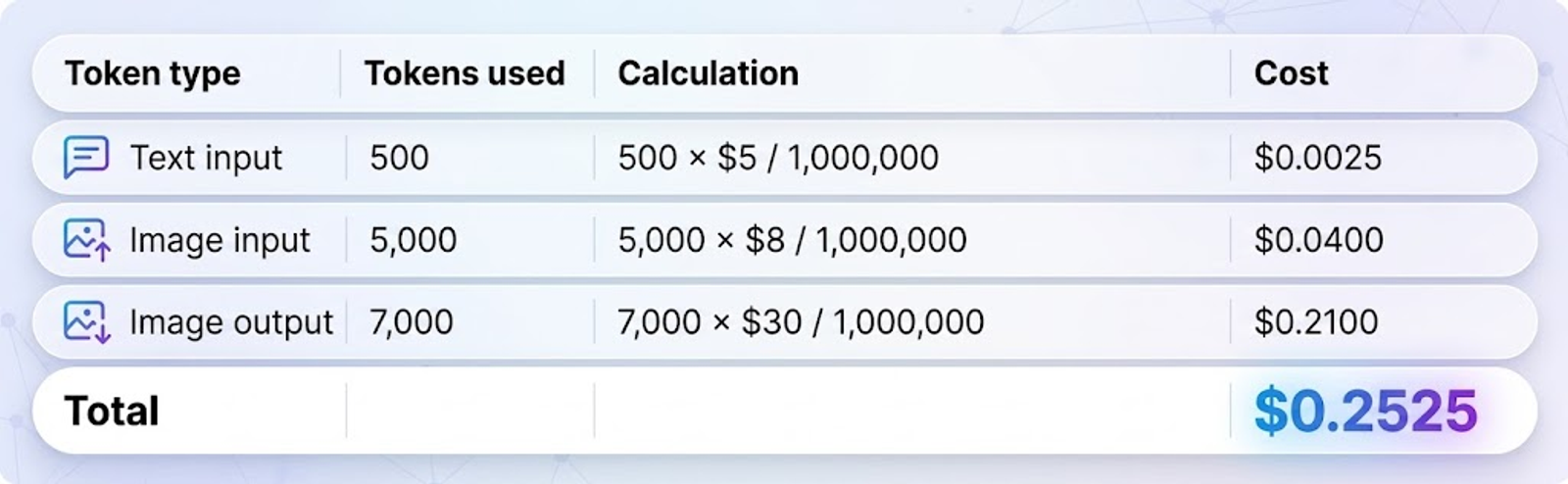
In this example, the image cost is a little more than 25 cents. This is only an example, not a normal price for one image. Your requests may use a different number of tokens.
After you make requests, check the usage data in the API response. It shows how many tokens your prompts, image sizes, and quality settings used.
If you use the Responses API, also include the main model's token usage. That cost is separate from the image cost above.
Using the GPT Image 2.5 Pricing Calculator
Make sure you use the right calculator. The GPT Image 2.5 Sunburst documentation says the GPT Image 2 calculator cannot estimate GPT Image 2.5 token use.
The calculator in OpenAI's Image Generation documentation works with both GPT Image 2.5 Sunburst and Flare. Choose a model, quality, width, and height to estimate output tokens and cost.
For example, a displayed estimate of 196 output tokens works out to:
196 × $30 / 1,000,000 = $0.00588 in image output costs
That is less than one cent for image output only. It applies to the settings selected in the calculator, not to every GPT Image 2.5 image.
The estimate does not include text input, image input, or streaming partial images. Use it as a first estimate. Then check real usage before making a full budget.
Is Flare Cheaper Than Sunburst?
They have the same price per token. But one image may cost more or less because the models can use different numbers of tokens.
Choose based on your task. Flare is for fast, everyday image creation. Sunburst is for more complex images and edits that need to be exact. To compare them, use the same settings with both models and check their usage data.
What Can Increase or Reduce Your Bill?
The output price is only part of the total. Your settings, source images, and cached inputs can also change the cost.
The table below uses OpenAI's official Image Generation documentation and API pricing.
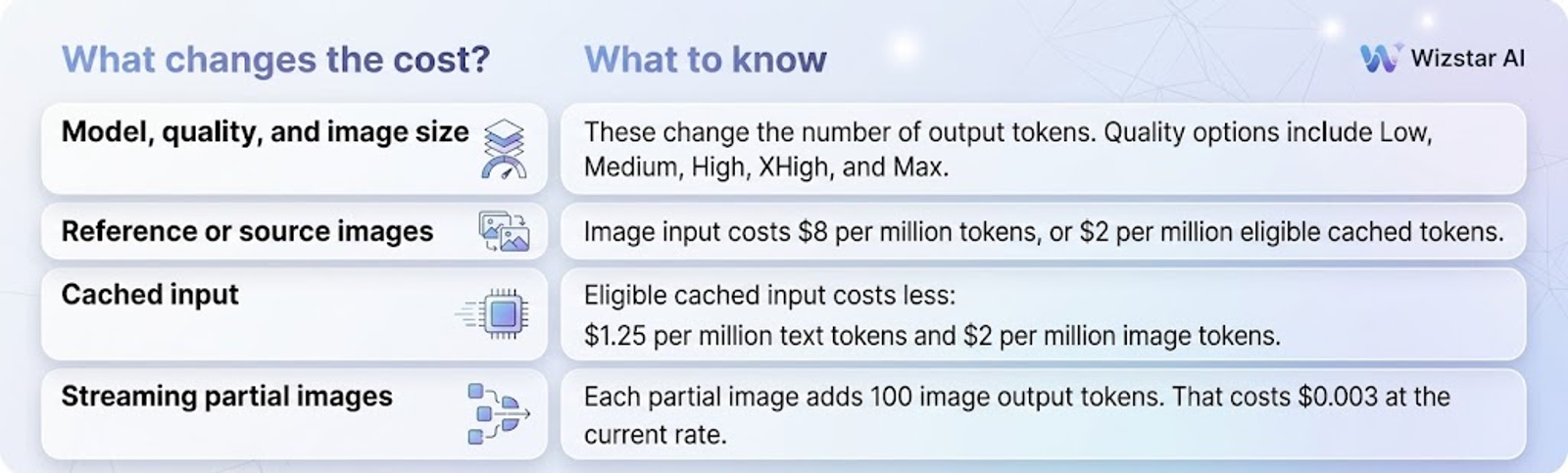
For image editing, include the source image in your estimate. An output-only estimate does not include this input cost. Each extra edit is also a new request.
If you request streaming previews through the partial_images parameter, budget for those too. Each partial image adds:
100 × $30 / 1,000,000 = $0.003
Partial images are previews you receive while the image is still being made.
For a better budget, test the same steps you plan to use. Include reference images, previews, and retries. The calculator gives an output estimate, while real request data shows the full picture.
The Bottom Line
If you use ChatGPT, check your plan's image limits. If you use the API, check the tokens used across all the steps needed to make your images.
Start with the GPT Image 2.5 calculator. Then test a few real requests. Include inputs, previews, and retries when you make your budget.
Want to create images on Wizstar? You can use GPT Image 2 on Wizstar now.
GPT Image 2.5 is coming soon to Wizstar. Sign up now and be ready to try the model as soon as it launches.
FAQ
- How do I estimate the cost of making many images?
- Test a few requests like the ones you plan to use. Find the average cost, then multiply it by the number of requests you expect to make. For example, if each request makes one image and costs $0.25 in total, 1,000 requests would cost about $250. This is just an example. Set aside extra money for more versions or edits. Do not add input costs again if they are already in your total.
- Why can two images of the same size cost different amounts?
- Size is only one setting. The model and quality can change token use. One request may also include a reference photo or previews while another does not. To compare prices fairly, keep these settings the same.
- Do I pay if a request fails or I try again?
- Do not assume that every failed request is free or that every failure has a charge. Check your usage records and OpenAI's billing rules for the error you received. If you try again, the new request can add costs of its own.
- What should I include in my app's image budget?
- Start with the full cost of a typical request, including its text, photos, and previews. Then estimate how many requests each user will make. Allow for extra versions and edits. If you use the Responses API, include the main model's charges too.
- Should I use ChatGPT or the API?
- ChatGPT is usually simpler if you want to create and edit images by chatting. Use the API if you want to add image creation to an app or run many requests without sending each one by hand. Keep your ChatGPT plan cost and API costs separate in your budget.
- How should I test Flare against Sunburst?
- Give both models the same prompts and photos. Use the same quality and image size. Compare the results as well as the cost. Track how many tries you need to get an image you would actually use.
- Can I use the calculator estimate to set my customer prices?
- Use it as a starting point, not a final price. Test real requests first and include all the costs you pay. Also allow for extra attempts before you decide what to charge customers.