The short answer
Kling VIDEO 3.0’s published App rates put a five-second clip at 30 credits for 720p without native audio and 60 credits for 1080p with native audio. Kling also publishes a 4K rate of 30 credits per second for the VIDEO 3.0 series, which gives a five-second planning estimate of 150 credits. Confirm the exact model, settings, and credit quote in the generation panel before budgeting a batch.
This article uses public Kling AI App documentation checked on November 11, 2026. The examples calculate credits from published rates. Account checkout prices, mode availability, and actual deductions require a signed-in check.
Which Kling 3.0 Price Applies to Your Workflow?
Your budget has two inputs: what the membership costs and how many credits the team will spend. Kling’s July 28 guide to VIDEO 3.0 credits lists monthly pools of 660 credits for Standard, 3,000 for Pro, 8,000 for Premier, and 26,000 for Ultra. Use those figures as dated planning references. The first-subscription offers and renewal prices on the same page reflect the July snapshot.
The public Kling AI App page still advertises plans from US$6.99. It leaves the full tier prices and renewal terms for a particular account unconfirmed. The generation preview also defaults to Kling 4.0, so select VIDEO 3.0 before recording a credit quote.
App Plan, Model Mode, and Billing Cycle
Kling’s paid terms, effective October 10, list Premier subtiers of 8,000, 18,000, 28,000, and 38,000 credits and name Ultra+ as a membership grade. The terms also describe Team Membership as priced per seat per month, with available billing cycles shown on the subscription page. For a shared production account, record the exact tier, seat count, credit allowance, and export benefits at checkout.
Keep the first payment, renewal charge, and billing period visible in the estimate. An annual offer may show a monthly equivalent while requiring a full year’s payment upfront. For a short client pilot, compare the amount due for the period you actually need.
How Many Credits Does a Product Clip Use?
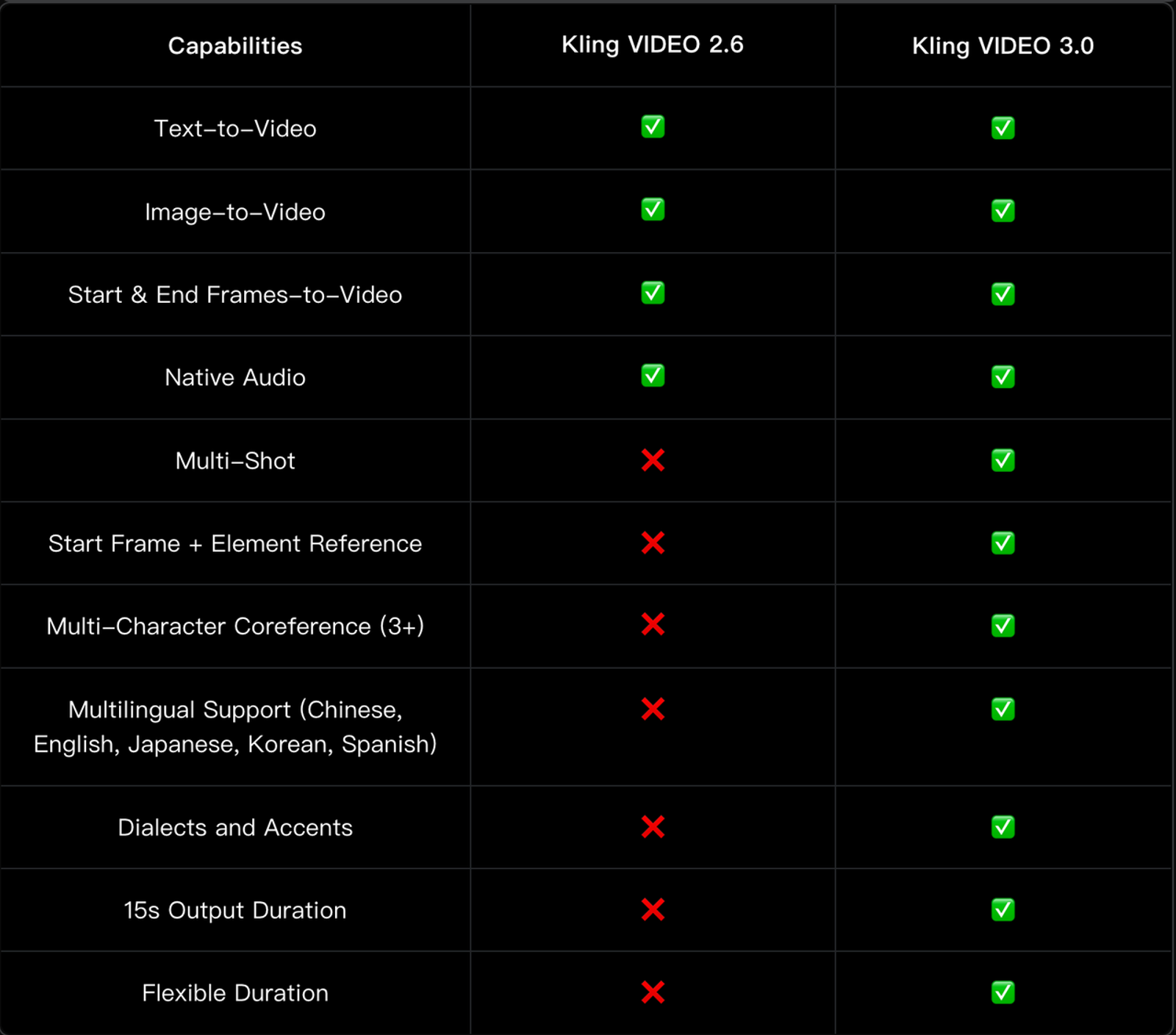
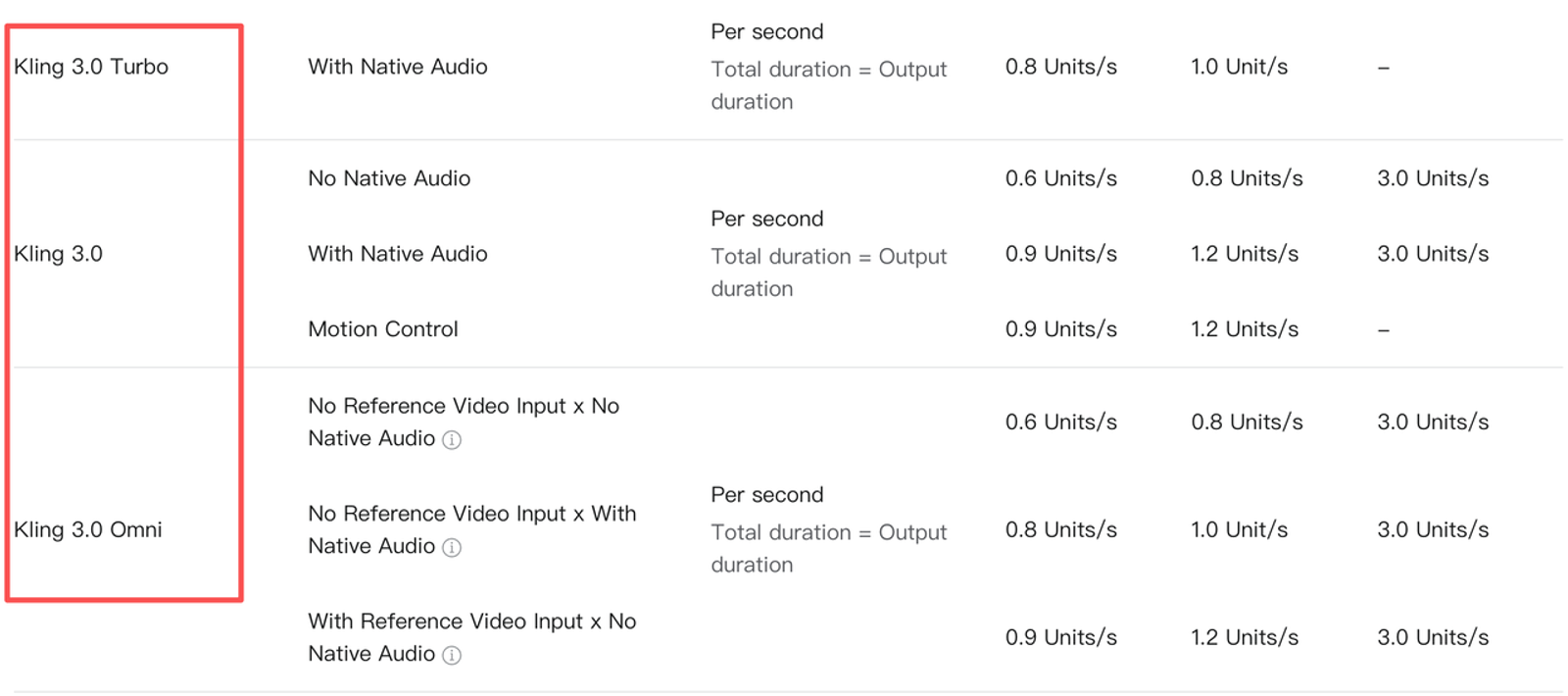
The VIDEO 3.0 model guide lists rates by resolution and native audio. Voice tone control adds 2 credits per second when used with native audio. That brings a five-second 1080p clip with both options to 70 credits.
| VIDEO 3.0 setting | Published rate | Five-second clip |
| 720p without native audio | 6 credits/sec | 30 credits |
| 1080p without native audio | 8 credits/sec | 40 credits |
| 720p with native audio | 9 credits/sec | 45 credits |
| 1080p with native audio | 12 credits/sec | 60 credits |
| 4K, series-level planning reference | 30 credits/sec | 150 credits |
The July guide gives the 4K figure for the series. It leaves the charge for specific audio and reference combinations to the generation panel. Check the quote if the brief calls for 4K, VIDEO 3.0 Omni, or another variant.
Duration, Quality, and Audio Settings
For a five-second product close-up that will get licensed music and approved text in editing, budget the first draft without native audio. A 720p draft may be enough to judge movement and framing. If the review depends on reading fine packaging print, choose the review resolution before the team generates a batch. A higher resolution gives reviewers more pixels to inspect, while the accuracy of the label still needs checking against the source photo.
Worked Cost for One Short Ad Shot
One five-second 1080p clip without native audio uses 40 credits. Three completed attempts use 120 credits. A fourth brings the total to 160. Those are spending scenarios for one shot, with approval left to the team’s review.
The Kling AI Credits Policy lists 66 credits per US$1 as the standard reference for separately purchased credits. The checkout determines available bundles and promotions. Purchased credits and membership benefits work separately, so a top-up alone may leave features such as 1080p generation or watermark removal unavailable.
What Should a Team Budget Beyond the First Render?
Revisions, Unusable Drafts, and Export Work
Count completed drafts rejected by the brand as campaign spend. Record the reason beside the task ID. “Logo changes during the turn” tells the editor what needs fixing and helps the team decide whether another render is worthwhile. If generation fails technically, keep the task status and deduction record so you can check the credit return.
The next edit is part of the cost. Include trimming, approved typography, sound clearance, placement crops, and export in the production estimate. If several takes change the same part of the label, compare another render with the time needed to composite the approved artwork.
Which Plan Fits the Expected Clip Volume?
A Low-Volume Test and a Repeat Campaign
Assume three completed five-second attempts per planned shot. At 40 credits per attempt for 1080p without native audio, two shots use 240 credits. Eight shots use 960 credits. The first scenario fits the published 660-credit Standard pool if it is otherwise unused. The second needs 300 more credits than that pool provides and fits the published 3,000-credit Pro pool.
At the 150-credit 4K planning figure, the same scenarios use 900 and 3,600 credits, respectively. The eight-shot scenario would exceed the published Pro pool by 600 credits. Compare the checkout price of a larger tier with the price of an eligible top-up. Confirm that the plan offers the required generation mode before using either figure for a purchase.
After a pilot, replace the three-attempt allowance with the team’s recorded results. Keep separate counts for straightforward packshots and shots that need precise packaging text, product movement, or continuity across cuts.
Conclusion
A five-second VIDEO 3.0 clip costs 40 credits at 1080p without native audio under the published App rate. A supported 4K mode has a 150-credit planning reference for the same duration. Estimate the completed attempts for each shot, then compare that credit requirement with the plan and export options available at checkout. That gives the team a budget tied to the work it expects to approve.
FAQ
- Does Kling’s free tier allow commercial product ads?
- Kling’s July plan comparison lists Basic output as noncommercial. The Kling AI Terms of Paid Service describe commercial use for eligible member output, subject to applicable terms. Confirm the generating account’s rights and clear the uploaded assets before client use.
- Do unused Kling credits carry into the next month?
- Regular subscription credits are valid for one month from distribution. Separately purchased credits are valid for two years. Promotional credits follow their own terms, so check which balance the account holds when planning work across billing periods.
- Are failed Kling 3.0 renders refunded?
- Kling’s general Credits Policy says it returns the corresponding credits when generation fails. If a failed task still shows a deduction, keep the task ID and balance record for support. A completed render that fails brand review remains part of the campaign budget.
- Is Kling 3.0 API pricing the same as App pricing?
- For API work, use Kling’s developer API rate schedule to quote the exact model and configuration. The credit estimates in this article apply to production in the Kling AI App.
- Can an annual Kling plan be canceled midterm?
- Kling’s paid terms allow you to turn off automatic renewal for the next cycle. They generally describe activated paid services as nonrefundable. Check the purchase channel’s cancellation steps and any applicable refund conditions before committing to an annual term.