The short answer
If the first shot of your ad depends on a small sound, Google Veo 3.1 can help you decide how that sound should land. A travel-mug lid might look closed on screen, but if the click comes early, the viewer hears the action before they see it. The producer then has to decide whether to keep the picture and rebuild the sound or replace the shot. This review gives you a brief for that decision, a way to judge picture and sound together, and a budget based on the takes you can actually use.
Quick Verdict for Sound-On Ad Concepts
Veo is most useful while the timing is still up for discussion. Should the viewer hear a voice first and look for the latch, or should the click get their attention on its own? The official Veo model page describes native dialogue, sound effects, and ambience, so a single prompt can give the team a version of the shot to discuss with those elements in place.
The production decision depends on what needs approval. If the ad’s main job is to show exactly how the lid closes, I’d start with approved footage of the real mechanism. If the team is still deciding how to introduce that action, a generated clip can help settle the timing before anyone books a shoot or records the final read.
How Do You Brief a Veo Audio-Video Clip?
Describe what the camera sees, what the viewer hears, and which action triggers the sound. “A satisfying click” leaves room for interpretation. “A short plastic click as the latch seats” gives the editor a specific moment to check.
One Message, One Shot, and One Sound Cue
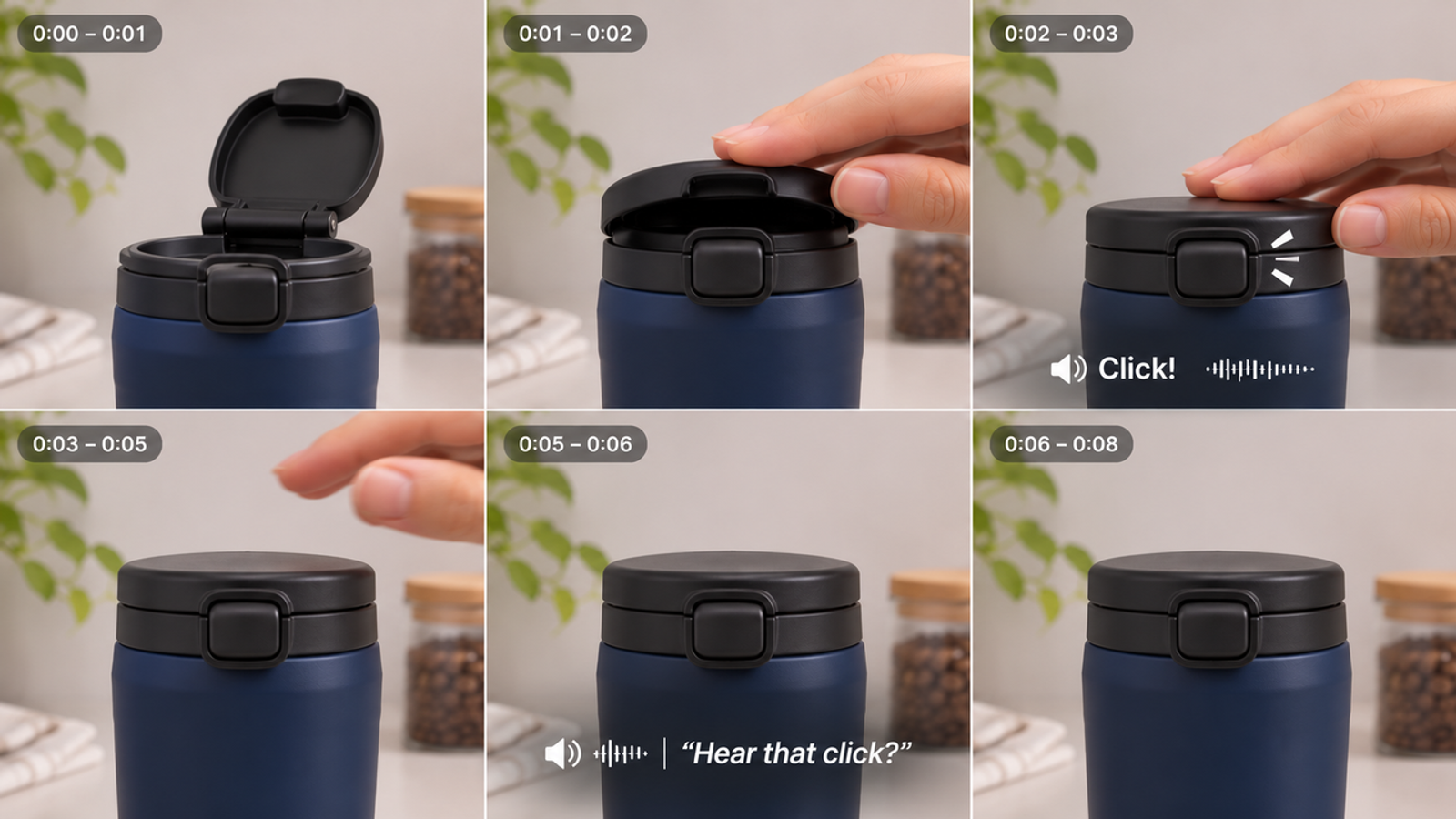
Use a brand-approved product description for the prompt and keep the authorized packshot and a recording of the real click for review. Here’s an illustrative brief for a travel mug with a flip lid. The selling point is that the lid clicks shut.
Create a continuous eight-second vertical close-up of a matte navy travel mug with a black flip lid on a pale kitchen counter. Keep the camera steady and the hinge and latch in view. A hand presses the lid down once. One short plastic click sounds as the latch seats. After a brief pause, an off-screen voice says, “Hear that click?” Hold on the closed lid after the line. Keep the background quiet and leave space above the mug for copy added in editing.
The off-screen line keeps attention on the latch and gives the editor room to replace the voice later. The fixed camera keeps the contact point visible. If another concept calls for a moving camera, these camera movement prompt examples show how to describe a specific move, such as a slow push-in, in the shot brief.
Choose an Access Route for the Brief
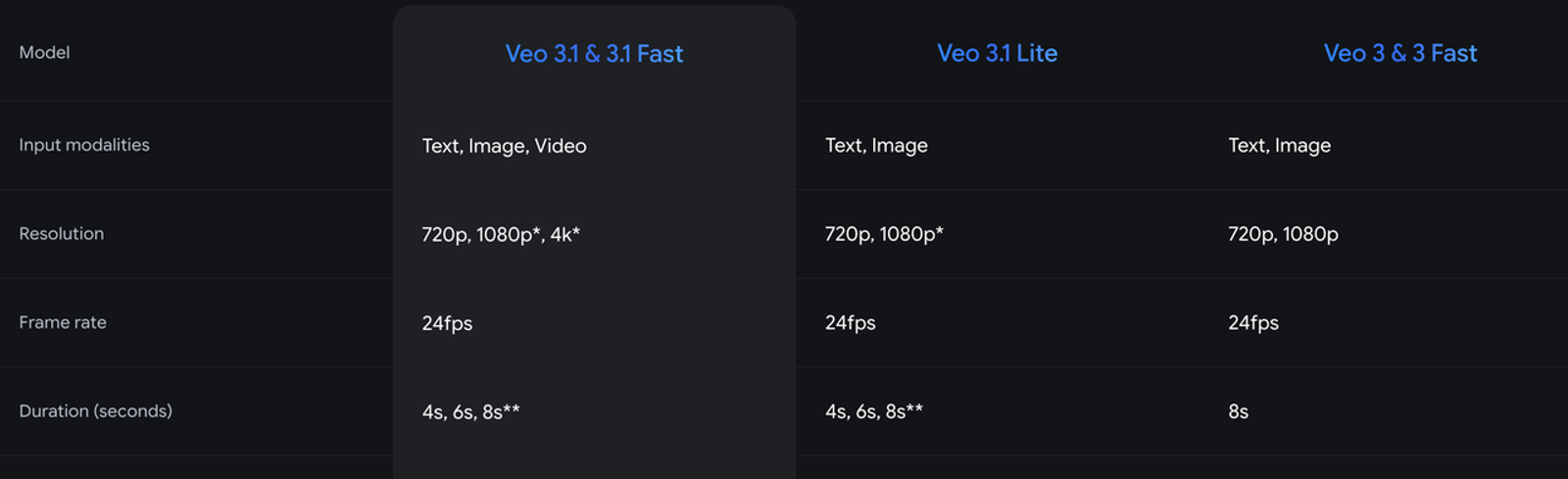
In Google Flow, Veo 3.1 Lite handles text-to-video at 720p and offers the eight-second vertical format used here. As of November 19, 2026, Flow also lists Veo 3.1 Fast and Quality, with both scheduled to retire on December 5, 2026. For a brief you expect to revisit after that date, start with Lite.
For API production, the Google Cloud Veo 3.1 model reference lists Generate and Fast Generate as generally available on Gemini Enterprise Agent Platform, with Lite in preview. Check your project’s regional access and quota before budgeting a batch. Google lists fixed quotas and provisioned throughput for these models and marks pay-as-you-go as unsupported.
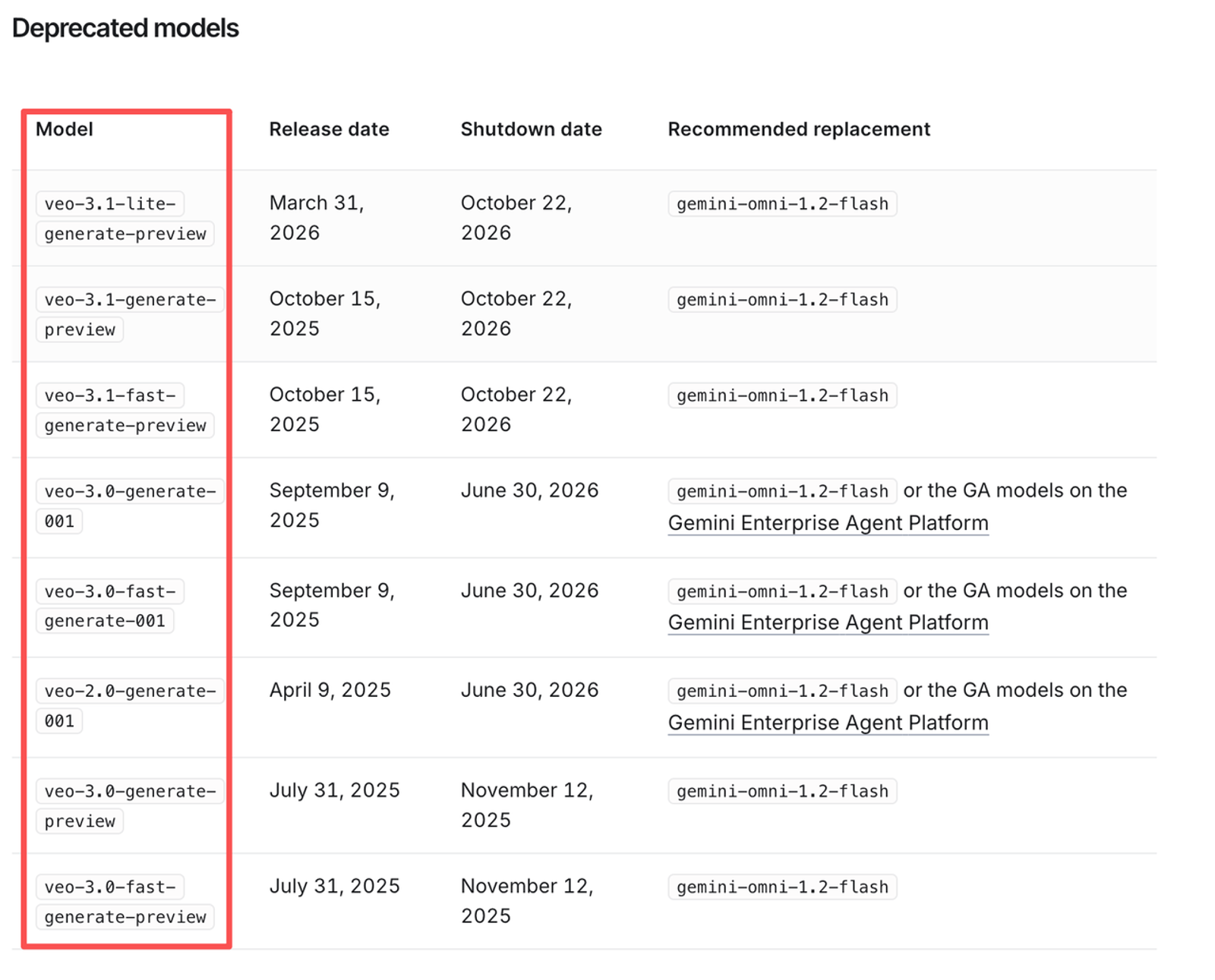
The Gemini Developer API follows a separate release schedule. Its retirement notice lists October 22, 2026 as the shutdown date for the Veo 3.1 preview endpoints and points developers to Gemini Omni 1.2 Flash.
How Should You Evaluate Picture and Sound Together?
Play the clip once on a phone at normal volume and ask a reviewer to describe what happened. “The lid clicked shut” is the intended read. If they heard a click but missed the latch, replay the moment at full size to see whether the framing, hand position, or sound timing drew their attention away.
Prompt Fidelity and Product Identity
I would check the latch before the lighting. Compare the generated mug with the approved packshot before the hand enters, as the thumb presses, and after the lid closes. If the latch shifts or the hinge changes shape under the hand, check whether the shot now shows a different way of closing the mug. A slightly uneven shadow on the counter is easier to live with in a concept review.
When the packshot itself is the starting frame, the Kling 4.0 vs. Veo 3.1 product ad test plan gives you a matched brief and criteria for comparing product shape, motion, and editing effort. Use the current Veo access routes above when setting up a new comparison.
Speech, Effects, and Timing
Listen for the click at the frame where the latch seats, then check whether the voice leaves it enough room. If the line starts over the click, play the cut through the phone speaker again. The voice may sound clear on headphones while covering the small detail the viewer was meant to hear.
Give the editor a note they can act on. “Click lands two frames before latch contact” points to a specific moment. If the timing works but the final word gets clipped by the next shot, see whether there’s room to extend the hold or bring the read forward without crowding the click.
What Are the Trade-Offs of Generated Audio?
A generated soundtrack lets the team hear a scene early. The trade-off arrives when someone asks for a small change and the delivered clip gives the editor one mix to work with.
Control and Postproduction Edits
Say the picture shows the lid closing correctly, but the click plays early. Mute the generated mix, place the approved click at latch contact, and lay the voiceover on its own timeline track. That gives the editor room to retime the line for a shorter cut or record another language. An on-camera speaker makes the same revision harder because the new line also has to fit the visible mouth movement.
Claims, Rights, and Human Review
Watch the shot with the copy that will actually run. A click followed by a simple product name makes a different claim from a click followed by “leakproof.” Have the product owner review the action and caption together. Clear any identifiable voice, likeness, music, or brand asset that appears in the finished ad.
Under the Google Cloud terms for generated output, Google treats generated output as customer data and makes no ownership claim over new intellectual property in that output as between Google and the customer. For Flow, check the applicable Google Terms of Service and product policies. Keep permissions for the finished creative with the campaign approval.
When Would Veo Fit a Sound-On Ad Hook?
Veo fits when the team can name the creative decision a new take will help settle. For the mug, compare a version where the voice directs attention to the lid before the press with one where the click gets the first beat. Keep the action and wording consistent so the review can focus on what the viewer notices first. If the opener becomes part of a larger campaign, this AI UGC ad testing workflow shows how to carry that same approach into a structured creative test.
Set a stopping rule before generating variants. For example, if two takes misrepresent how the latch closes, switch to a filmed close-up. If the picture passes and timing is the only issue, open the edit and move the sound there. This keeps the team from paying for another round just to fix something it can already control.
Cost per Usable Audiovisual Shot
At standard 720p settings, Flow’s credit schedule lists Veo 3.1 Lite at 5 credits per generation for Google AI Ultra subscribers and 10 for other users. Count charged outputs, including clips that generate successfully and get rejected in review. In a budget example, six charged generations at 10 credits each with two approved clips comes to 30 credits per usable shot. For Cloud, divide the generation cost for the batch, including any share of provisioned capacity costs you allocate to it, by the number of clips approved for the same use.
The next edit is part of the cost. Log review and repair time alongside generation spend, especially when a take needs a new voiceover or a replacement effect. Use the same approval standard for each route you compare. A rough concept clip and a cut cleared for paid media represent different amounts of work.
Conclusion
For the first creative review, put two versions of the same approved brief side by side and ask which one makes the product action easier to understand. Record the take you’d keep, the change it still needs, and the cost to get it approved. That gives the producer enough to decide whether the final opener should come from Veo, the edit, or a product shoot.
FAQ
- Is generated dialogue available in every Veo variant?
- No. Veo 2 generates video only. Veo 3 introduced native dialogue, and Veo 3.1 Generate, Fast, and Lite support generated speech on documented sound-enabled routes.
- Can Veo export separate dialogue and effects tracks?
- Google documents MP4 output with a generated audio track for its Cloud Veo 3.1 models. The output specification lists no separate dialogue, effects, or music stems.
- Can Veo use an uploaded voice recording as an input?
- No. Google Cloud lists audio input as unsupported for Veo 3.1 Generate, Fast Generate, and Lite. Add a specific approved recording in the edit.
- Does the Veo API accept audio instructions?
- Yes. With the Google Cloud Veo API, describe the spoken line and sound cues in the text prompt. The
generateAudioparameter controls whether the API generates audio. - How are Veo outputs labelled as AI-generated?
- Google says Veo videos carry an invisible SynthID watermark. Cloud Veo 3.1 also supports C2PA Content Credentials for provenance. In Flow’s watermark settings, users can control the visible overlay where eligible. Flow applies it automatically for users in India, South Korea, and Vietnam outside the Google AI Ultra 20x plan.